Deck: Your crypto wallet doesn't actually hold any crypto. It holds keys. Here's what a private key, a public key and an address are, how they fit together, and why it matters who holds them.
Last reviewed: October 24, 2026
Here's something that surprised a lot of us when we first dug in: there are no coins inside a crypto wallet. Not in the app on your phone, and not in that little hardware device in your drawer.
ethereum.org says it plainly: "You never really hold cryptocurrency, you hold private keys – the funds are always on Ethereum's ledger" (ethereum.org: accounts). The same is true for Bitcoin, XRP and pretty much every other network.
Once that clicks, a lot of other things make sense. You'll see why the seed phrase matters so much, why sharing an address is safe but sharing a key isn't, and why "not your keys, not your coins" became a saying. This guide builds on How a Blockchain Works, so if blocks and nodes are new to you, start there.
The short version
- The coins are entries on the blockchain, tied to an address.
- The address is like your mailing address. It's safe to share, and people use it to send you crypto.
- The private key is the secret that lets you move whatever is at that address. Whoever has it controls the coins.
- The public key sits in between. It's made from the private key, and the address is made from it.
- The wallet is the app or device that keeps your private keys and uses them to sign transactions.
- The seed phrase is a 12- or 24-word backup that can recreate all of your keys.
Your coins live on the blockchain, not in your wallet
Remember that a blockchain is a big shared ledger. It doesn't record "Sam has 850 XRP." It records "this address holds 850 XRP." Anyone can look any address up (our blockchain explorer guide shows you how).
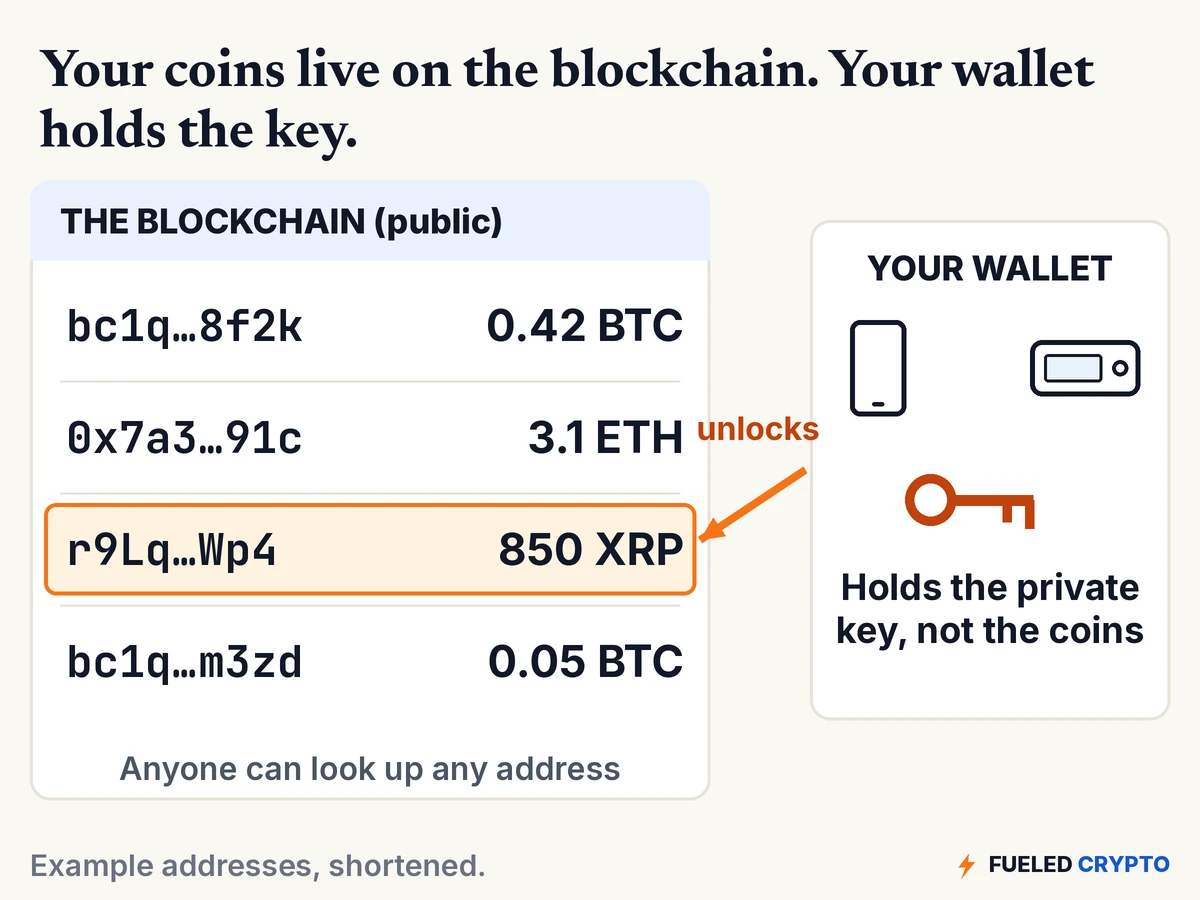
Your wallet's job is to keep the key for that address and to show you what the ledger says you have. ethereum.org describes wallets as "a window to see your assets" and notes that wallet providers "don't have custody of your funds" (ethereum.org: wallets). That's also why you can switch to a different wallet app, or restore on a new device, and your coins are right where you left them: still on the chain.
The three pieces: private key, public key, address
The private key: your secret
A private key is a very large random number. On Ethereum it's written as 64 characters of letters and numbers (ethereum.org: accounts). It's so large that guessing someone else's is not a realistic attack. Bitcoin's valid range is close to 2²⁵⁶ possible keys, a number with 78 digits (Bitcoin developer guide: wallets).
You'll almost never see your private key. Your wallet keeps it out of sight and uses it for you.
The public key: made from the private key
Your wallet runs the private key through a one-way math function (elliptic-curve cryptography, if you want the term) to produce a public key (ethereum.org: accounts, Bitcoin developer guide: wallets). The important part is the direction: going from private to public is easy, and going back is not. In ethereum.org's words, "you cannot derive a private key from public keys."
The address: what you share
The address is a shorter, friendlier version made from the public key, usually by running it through a hash (the "fingerprint" idea from the blockchain guide). Each network has its own format:
| Network | Addresses usually look like | Source |
|---|---|---|
| Bitcoin | Start with bc1 (newer formats; older ones start with 1 or 3) | BIP 173 |
| Ethereum | 0x followed by 40 letters and numbers (42 characters total) | ethereum.org |
| XRP Ledger | Start with r, 25 to 35 characters | xrpl.org |
ethereum.org's own analogy is a good one: your address is like your home address. Telling people where you live is fine, because you still have a key to the front door that only you control (ethereum.org: how to use a wallet).
So, can someone steal your crypto just by knowing your address? No. They can see your balance and history, because the ledger is public, but they can't move anything without the private key. (They can, however, use what they see to target you with scams, so it's reasonable to be choosy about where you post an address.)
Where the seed phrase fits
Older wallets made you back up every key one by one. Today, almost all wallets start from a single seed phrase (also called a recovery phrase), usually 12 or 24 words picked from a standard list of 2,048 words (BIP 39). From that one phrase, the wallet can generate a whole family of private keys, and so a whole family of addresses (Bitcoin developer guide: wallets).
That's why your wallet can show you a fresh receiving address every time and still restore all of them from the same 12 or 24 words. It's also why the seed phrase is the single most important thing to protect. Anyone who has those words can rebuild every key on any device.
How to store it, where never to keep it, and what to do if it's exposed is its own topic, and we've covered it in Seed Phrase Basics.
How a wallet actually "sends" crypto: signing
When you tap "Send," your wallet doesn't push coins anywhere. It writes a message, something like "move 1 coin from my address to this address," and signs it with your private key. The signature is a piece of math that only that private key could have produced for that exact message. Then the wallet broadcasts the signed message to the network.
Every node can check the signature against the public key, without ever seeing the private key. If it checks out, the transaction can go into a block. ethereum.org explains that the key pair helps "prove that a transaction was actually signed by the sender and prevent forgeries" (ethereum.org: accounts).
Two things fall out of this:
- The private key never has to leave your wallet. Only the signed message goes out. This is the whole idea behind hardware wallets: the key stays on the device, and you approve each signature on its screen (Bitcoin developer guide: wallets).
- A signature can't be reused for a different transaction. Change the amount or the destination and the old signature fails the check.
This is also where a lot of scams aim. Since the network accepts anything that's properly signed, the trick is getting you to sign something you didn't mean to. See How to Avoid Crypto Scams.
Who holds the keys? The three common setups
The phrase "not your keys, not your coins" is really just a question: who holds the private key?
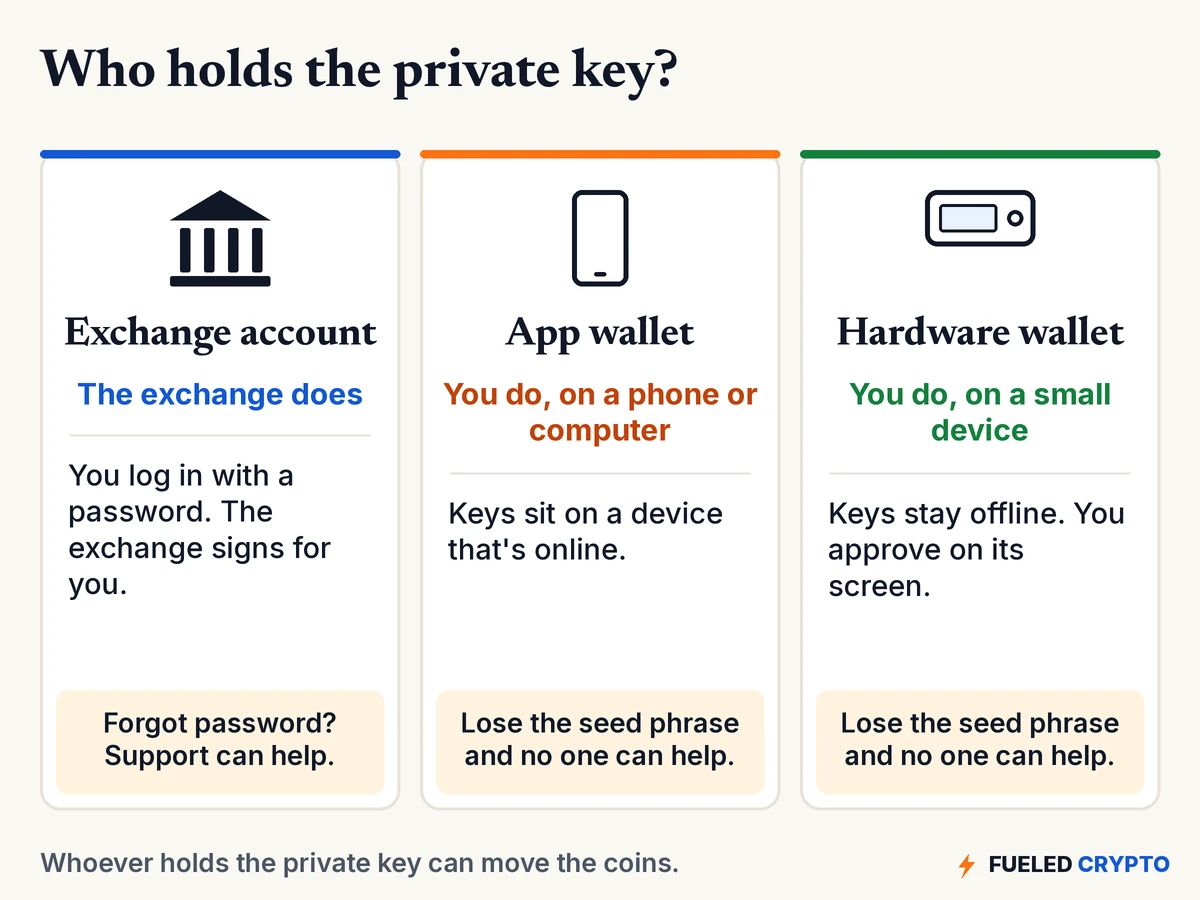
- An exchange account (custodial). When you buy on an exchange and leave the coins there, the exchange holds the keys and signs for you. You log in with a username and password, and if you forget the password, support can help you back in. The trade-off is that you're trusting the exchange with custody, and ethereum.org notes that if the exchange runs into financial trouble, your funds are at risk (ethereum.org: wallets).
- An app wallet on your phone or computer (self-custody, "hot"). You hold the keys, and the app stores them on a device that's connected to the internet. That's convenient, but the Bitcoin developer guide notes that keeping keys on an internet-connected device is the main disadvantage of this setup (Bitcoin developer guide: wallets).
- A hardware wallet (self-custody, "cold"). You hold the keys on a small dedicated device that signs transactions without exposing the key to your computer. You check and approve each transaction on the device's own screen. Our Hardware Wallet Setup Guide walks through setting one up, and How to Move Crypto to Cold Storage covers moving coins onto it.
With either self-custody option, there's no "forgot password" button. ethereum.org puts it simply: "there's no customer support in crypto. You are responsible for keeping your keys safe and secure" (ethereum.org: wallets). Plenty of people use more than one setup for different purposes. Which one fits you is a personal call, and this guide is meant to help you understand the trade-offs, not to make that call for you.
Common mix-ups (and the facts)
- "My coins are on my Ledger." They're on the blockchain. The Ledger holds the key. If the device breaks, your seed phrase can restore access on a new one.
- "If I delete the app, I lose my crypto." Not if you have your seed phrase. The coins never left the chain. Without the seed phrase, though, deleting the only copy of your keys can mean losing access for good.
- "Sharing my address is dangerous." Sharing it is how you get paid. Sharing your seed phrase or private key is what's dangerous. No legitimate support team will ever ask for either.
- "One wallet works for every coin." Many wallets support several networks, but each network has its own address format. Sending coins to an address on the wrong network can lose them. When sending to an exchange's XRP address, you may also need a destination tag, a number that tells the exchange which customer to credit (xrpl.org: destination tags). Our cold storage guide covers how to check this before you send.
- "Every time I receive, I need the same address." Many Bitcoin wallets show a new address each time to help with privacy. All of them come from your seed phrase and all of them are yours.
Words you'll keep hearing
- Private key: the secret number that controls an address. Never share it.
- Public key: made from the private key. Used to check your signatures.
- Address: a shorter code made from the public key. Safe to share.
- Seed phrase (recovery phrase): the 12 or 24 words that can regenerate all your keys.
- Signature: proof, made with your private key, that you approved a specific transaction.
- Wallet: the app or device that holds your keys and signs for you.
- Custodial: someone else (like an exchange) holds the keys.
- Self-custody / non-custodial: you hold the keys.
- Hot wallet / cold wallet: keys on an internet-connected device vs. keys kept offline.
- Destination tag: an extra number some XRP deposits need so an exchange knows whose account to credit.
Frequently asked questions
What does a crypto wallet actually hold? Private keys, not coins. The coins are recorded on the blockchain at your address, and the wallet holds the key that lets you move them.
What's the difference between a private key and a public key? The private key is a secret number that signs your transactions. The public key is made from it and lets anyone check those signatures. You can't work backward from the public key to the private key.
Is a wallet address the same as a public key? Not quite. On most networks the address is a shorter code made from the public key, usually by hashing it. It's the part you share so people can send you crypto.
Can someone steal my crypto if they know my wallet address? No. An address lets people see your balance and send to you, but moving funds requires the private key. Be careful anyway, since a visible balance can make you a target for scams.
What's the difference between a seed phrase and a private key? A seed phrase is a 12- or 24-word backup that can regenerate all of your wallet's private keys. Protecting it protects every address the wallet has created.
What happens to my crypto if I lose my phone or hardware wallet? The coins stay on the blockchain. With your seed phrase you can restore access on a new device. Without it, and with no other copy of your keys, access may be lost for good.
What's the difference between a custodial and a non-custodial wallet? With a custodial setup, such as an exchange account, the company holds the keys. With a non-custodial (self-custody) wallet, you hold the keys and the responsibility that comes with them.
Where to go next
- Seed Phrase Basics: how to store the one backup that matters most.
- Hardware Wallet Setup Guide: set up a Ledger or Trezor step by step.
- How to Read a Blockchain Explorer: look up your own address and see the ledger for yourself.
- Coming next in this series: what actually happens when you send crypto, including fees and confirmations.
Sources
- ethereum.org, Ethereum accounts (private and public keys, 0x addresses, "you never really hold cryptocurrency").
- ethereum.org, Wallets and How to use a wallet.
- Bitcoin Developer Guide, Wallets (key range, full-service vs. hardware wallets, deterministic key creation).
- BIP 39 (mnemonic seed phrases, 2,048-word list) and BIP 173 (bc1 addresses).
- XRP Ledger docs, Addresses and Source and destination tags.
All diagrams and animations are original Fueled Crypto graphics. Addresses and signatures shown in them are shortened examples, not real ones.
Hardware Wallets: Common Options (Optional)
If you decide you want a hardware wallet, two safety basics come up again and again: buying straight from the manufacturer (not a reseller or marketplace) and setting up a brand-new seed phrase yourself. Our Hardware Wallet Setup Guide covers the rest.
Ledger and Trezor are two common options if you decide you want one, and they aren't the only ones. These links go to each maker's official store: Ledger or Trezor. Each product is offered by its own company, which is responsible for it, so review the product and its terms yourself before choosing. Fueled Crypto may earn a commission if you buy through these links, at no extra cost to you. Typing ledger.com or trezor.io into your browser yourself gets you to the same place.
Fueled Crypto publishes news and education, not investment, tax, or legal advice. Crypto assets are volatile and can lose value. Do your own research and consider a licensed professional before making financial decisions. See our full disclaimer and affiliate disclosure.
Want plain-English crypto news once a week? Subscribe to Fueled Crypto.