Deck: A hardware wallet is only as safe as the path it took to reach you. Here's how to check a new one before you trust it with anything: where it came from, what's in the box, how it should start up, and what to do if something looks wrong.
Last reviewed: October 24, 2026
A hardware wallet's whole job is to keep your keys away from the internet. But scammers know that, too. Ledger, for one, warns about devices that arrive pre-set-up with a recovery phrase, fake "replacement" devices, and letters asking people to type their phrase into a website. Trezor warns never to use a device that arrives with firmware already installed.
The good news is that most tampering tricks rely on you skipping a few simple checks. This guide walks through them in plain English. It uses Ledger and Trezor as examples because both publish detailed official checks, but other makers publish their own, and your device's official guide always comes first.
The short version
- Where it came from matters most. Buy from the maker's official store or a seller the maker lists as authorized.
- A genuine new wallet never comes with a recovery phrase or a PIN. If words are already written on the card, or a PIN is supplied, stop.
- The device should start fresh and create a brand-new recovery phrase for you, on its own screen.
- Check the packaging against the maker's official photos. Some devices use tamper-evident seals; know what yours should look like.
- Run the maker's authenticity check in its official app. It's a strong check, but not a perfect one.
- If anything is off, don't send crypto to it. If you already did, move it to a new wallet with a new recovery phrase.
Six checks, in order
When Kim's new hardware wallet arrives, she doesn't plug it in and send it everything. She goes through six checks first. None of them takes long.
1. Where did it come from?
This is the check that matters most, because it decides how many strangers had a chance to handle the device before you. Trezor's support site puts it simply: never buy one from an unauthorized third party, "as you can never tell who may have had access to it before you." Ledger says buying from unlisted, unknown sellers "introduces material security risks."
Both makers sell through their own websites and list the other sellers they authorize. If you bought secondhand, from an unlisted seller or were given one, be extra careful with every check below. A device you didn't order at all, such as a surprise "replacement" or a giveaway, is a red flag on its own. Ledger lists unexpected "replacements" from fake support and unsolicited packages among the ways scam devices reach people.
2. Does the box look right?
Compare what you received with the maker's official list of box contents and photos for your model. Ledger notes that packaging can vary slightly between production runs and that small differences like that are normal, so look for things that are clearly wrong rather than tiny details.
Some devices use tamper-evident seals. Trezor, for example, puts a holographic seal over the USB port on most current models (and on the box for its oldest model). Its guidance: the seal should be clean and firmly attached with no tears, and peeling it off normally leaves a "VOID" pattern behind. Trezor also says it introduced a new seal design in April 2024, so two different-looking seals can both be genuine. That's exactly why the official photos for your model matter.
3. Is the recovery sheet blank?
This is the clearest red flag of all. A recovery phrase (also called a seed phrase or wallet backup) is the master key to your wallet, as our guide to wallets and keys explains. If it came pre-printed in the box, someone else already knows it.
Ledger's support site says a legitimate device "never comes with a pre-written Secret Recovery Phrase" and that yours "must be generated by you, on the device itself." Trezor says there is no default seed. The same goes for a PIN: you choose it during setup, so a supplied PIN or password is a warning sign. Our seed phrase guide explains why the phrase must stay private.
4. Does it start fresh?
A new device should walk you through setting it up as new. Be wary if it's already set up, shows an existing wallet, or tells you to "restore" using words someone gave you.
The details differ by maker. Trezor says its devices ship without firmware (the device's operating software), so if yours already has firmware installed when you first connect it, Trezor says not to use it. On Ledger devices, the official app runs an automatic check during setup (more on that below).
5. Does it show you a new recovery phrase?
During setup, the device itself should display a brand-new recovery phrase on its own screen for you to write down. That's the moment the secret is born, and it should only ever exist on the device and on your own paper (or metal) backup. Never type it into a computer, phone or website. Our Hardware Wallet Setup Guide covers setup step by step.
6. Does the official authenticity check pass?
Most makers offer a way to check that the device's secure chip is genuine. Ledger calls this Genuine Check; it runs automatically during setup and when you connect the device to My Ledger in Ledger's official app. Trezor runs an authentication check on its Safe models using their secure element. Only use the maker's official app, downloaded from its official website, which you've typed in yourself.
These checks are strong, but they have limits, and it's worth knowing them. Ledger says its Genuine Check "cannot detect unauthorized physical modifications to the hardware—such as spying implants—if the original Secure Element remains intact." That's one more reason the first check, where it came from, matters so much.
Red flags at a glance
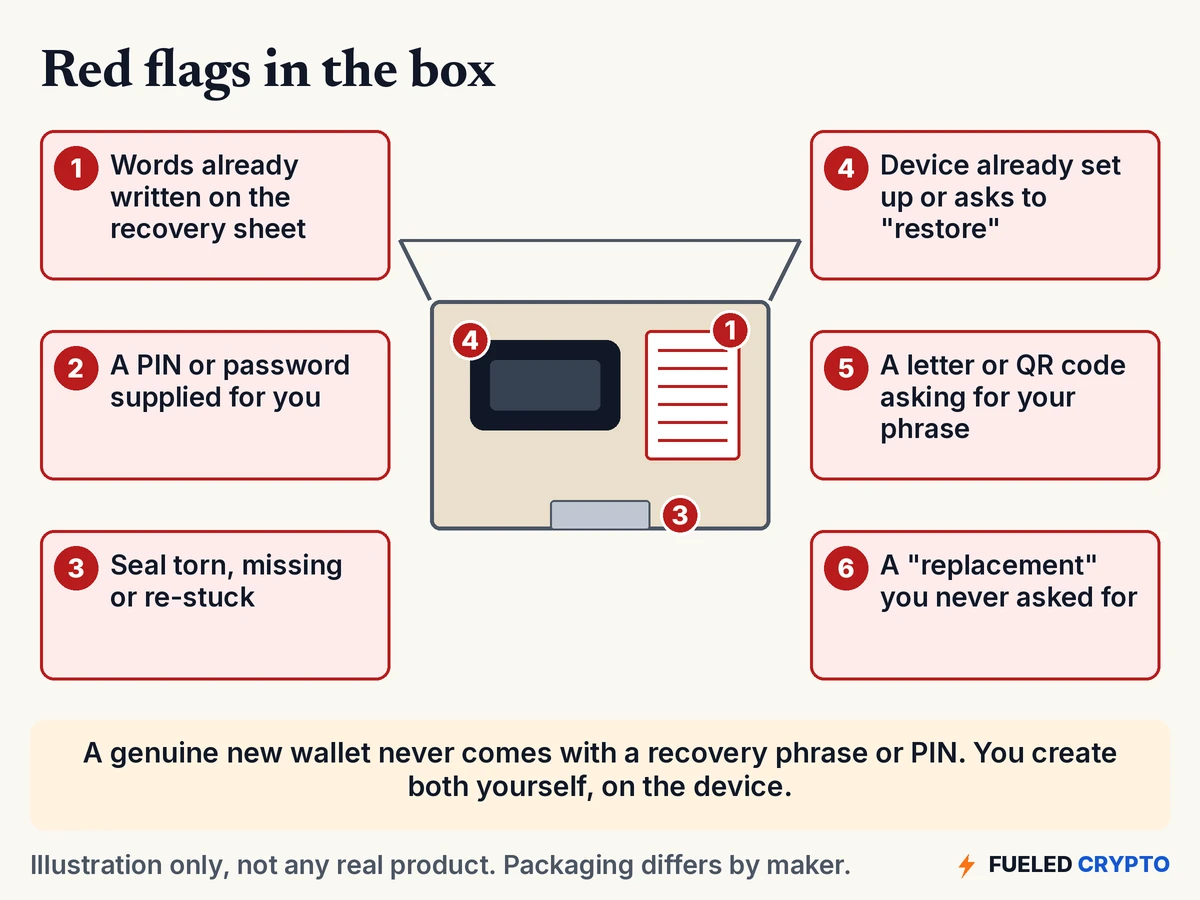
One of these deserves its own warning: mail scams. Ledger says scammers have sent paper letters that pose as official notices, with urgent claims and QR codes leading to fake websites that ask for your recovery phrase. Ledger says it "almost never" sends physical mail to customers and will never ask you to enter your recovery phrase anywhere. No real company will. Our scam guide covers more tricks like this.
If something seems off
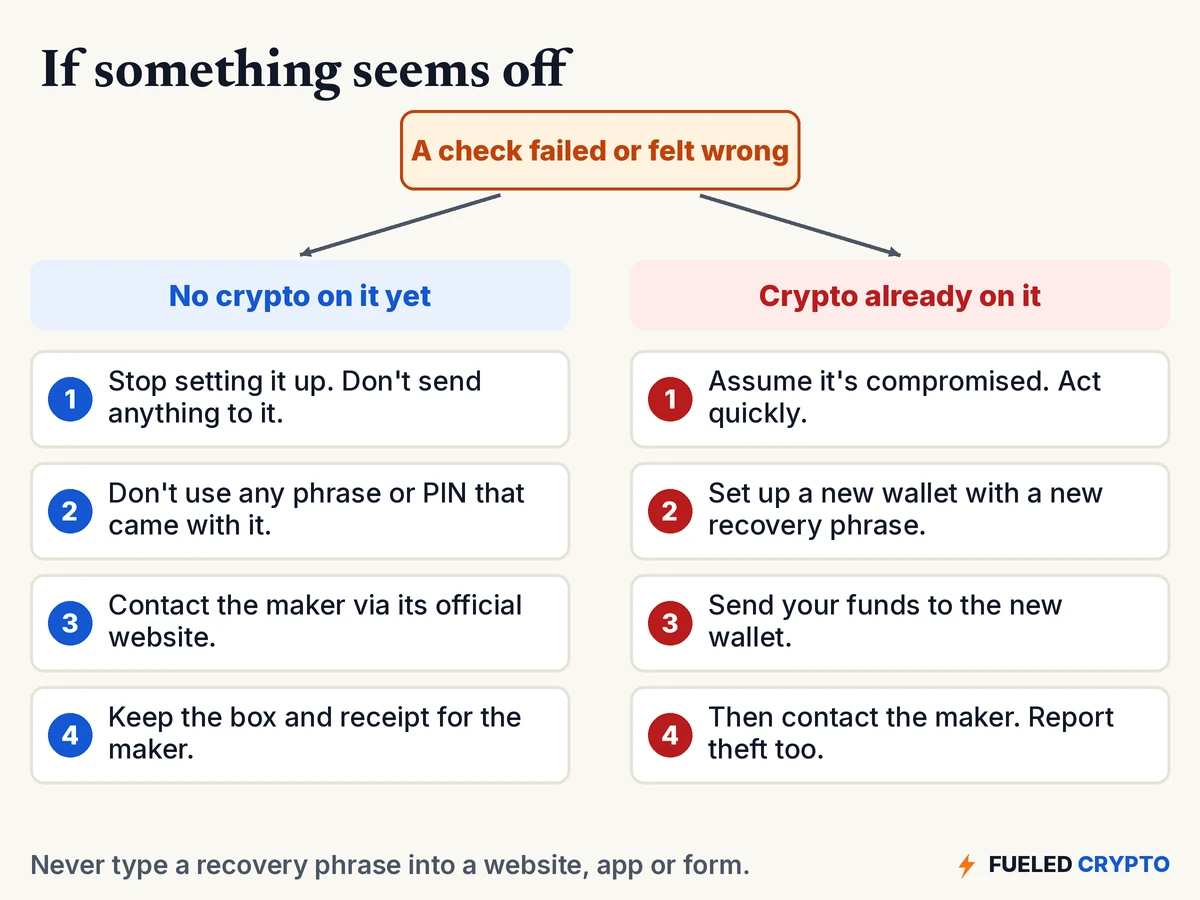
If you haven't sent any crypto to it yet, you're in a good spot. Stop setting it up, don't use any phrase or PIN that came with it, and contact the maker through its official website (typed in yourself, not from a link in the box). Keep the packaging and your receipt.
If you already sent crypto to it, move quickly. Trezor's advice if you suspect a wallet backup is compromised is to assume it is and move your funds to a wallet with a brand-new backup right away. That means setting up a different, trusted device (or wallet) with a new recovery phrase and sending your funds there. Then contact the maker. If anything has already been taken, our guide on what to do if your crypto is stolen covers reporting.
A checklist to keep
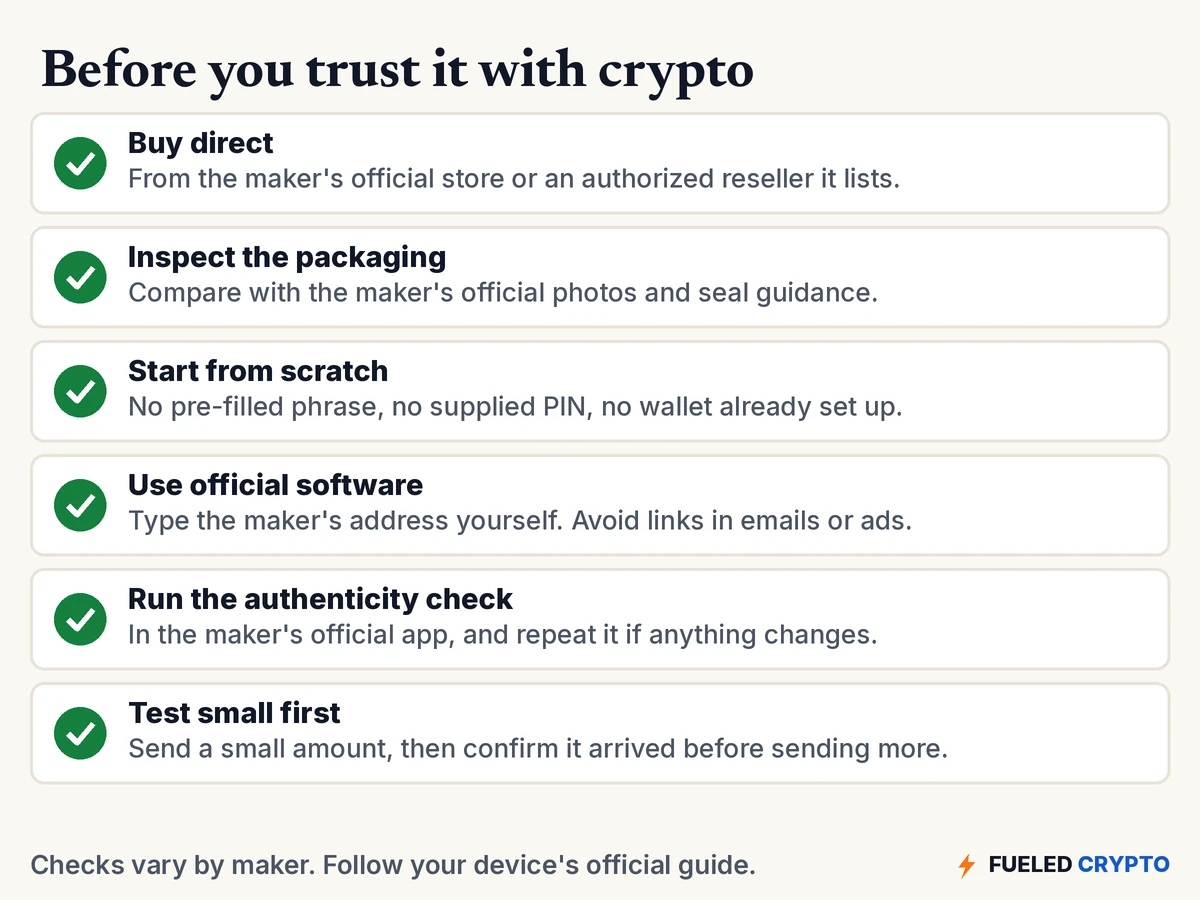
The last item isn't a tamper check, but many people find it reassuring: send a small amount first, confirm it shows up, and practice the routine before moving more. It costs a network fee but helps catch setup mistakes early.
Common mix-ups
- "It came sealed, so it's safe." Seals help, but they're one check among several. A blank recovery sheet and a fresh start matter just as much.
- "The recovery card in the box is for convenience." A pre-filled phrase is never genuine. Someone else knows it.
- "Small differences in the packaging mean it's fake." Not necessarily. Makers change packaging and seals over time. Compare against official photos for your model.
- "The authenticity check passed, so nothing can be wrong." It proves the secure chip is genuine. Ledger says it can't detect every physical modification.
- "A letter from the wallet company asked me to verify my phrase." That's a scam. No legitimate company asks for your recovery phrase.
Words you'll keep hearing
- Recovery phrase (seed phrase, wallet backup): the list of words that can restore your wallet. Whoever has it controls the funds.
- Pre-seeded device: a device set up in advance with a phrase someone else knows. A scam.
- Tamper-evident seal: a sticker designed to show visible damage if removed.
- Firmware: the software that runs on the device.
- Secure element: a tamper-resistant chip that stores secrets and can prove it's genuine.
- Authenticity check: the maker's test, in its official app, that the device is genuine.
Frequently asked questions
How do I know if my hardware wallet is genuine? Check where it came from, compare the box and any seal with the maker's official photos, make sure the recovery sheet is blank, confirm it starts fresh and creates a new phrase, and run the maker's authenticity check in its official app.
My hardware wallet came with a recovery phrase. Is that normal? No. A genuine new hardware wallet never comes with a pre-written recovery phrase. Don't use it, don't send any crypto to the device, and contact the maker through its official website.
Is it safe to buy a hardware wallet secondhand? Makers advise buying from their official store or an authorized seller, because you can't know who handled a secondhand device. If you have one, reset it, run every check and set it up with a brand-new recovery phrase before use.
What does Ledger Genuine Check do? It asks the device's secure chip for cryptographic proof that it's genuine, during setup and when you connect to My Ledger. Ledger says it can't detect physical modifications, such as spying implants, if the original secure element is intact.
What should a Trezor seal look like? Trezor's current models have a holographic seal over the USB port that should be clean, firmly attached and untorn. Peeling it leaves a "VOID" pattern. Trezor changed the seal design in April 2024, so compare with official photos for your model.
What if I already sent crypto to a wallet I now suspect? Assume it's compromised and act quickly. Set up a new wallet with a brand-new recovery phrase on a trusted device, move your funds there, then contact the maker and report any theft.
Would a wallet company ever mail me a letter asking for my recovery phrase? No. Ledger says it almost never sends physical mail and will never ask you to enter your recovery phrase anywhere. A letter or QR code asking for it is a scam.
Where to go next
- Hardware Wallet Setup Guide, for setting up a device step by step.
- Seed Phrase Best Practices, for storing your phrase safely.
- Hot vs. Cold Wallets, for where hardware wallets fit.
- What to Do If Your Crypto Is Stolen, if the worst happens.
Sources
- Ledger: Best practices to securely buy a Ledger signer; support articles on checking your device is genuine, hardware integrity and Genuine Check, pre-seeded device scams and physical mail phishing.
- Trezor: Is my device safe to use?, Authenticate Trezor Safe 3, "Firmware is already installed", Move crypto to a wallet with a new wallet backup.
All diagrams and animations are original Fueled Crypto graphics. The box and device are generic illustrations, not any real product. Names are made up.
Hardware Wallets: Common Options (Optional)
If you decide you want a hardware wallet, two safety basics come up again and again: buying straight from the manufacturer (or a seller it lists as authorized) and setting up a brand-new seed phrase yourself. Our Hardware Wallet Setup Guide covers the rest.
Ledger and Trezor are two common options if you decide you want one, and they aren't the only ones. These links go to each maker's official store: Ledger or Trezor. Each product is offered by its own company, which is responsible for it, so review the product and its terms yourself before choosing. Fueled Crypto may earn a commission if you buy through these links, at no extra cost to you. Typing ledger.com or trezor.io into your browser yourself gets you to the same place.
Fueled Crypto publishes news and education, not investment, tax, or legal advice. Crypto assets are volatile and can lose value. Do your own research and consider a licensed professional before making financial decisions. See our full disclaimer and affiliate disclosure.
Want plain-English crypto news once a week? Subscribe to Fueled Crypto.