Deck: "Hot" and "cold" describe one thing: whether the keys that control your crypto sit on an internet-connected device. Here's what that changes in practice, what each one protects against, and the questions worth asking before you pick.
Last reviewed: October 24, 2026
Once you learn that a crypto wallet really holds keys, not coins, the next question comes fast: where should those keys live? That's the whole hot-versus-cold debate. It sounds technical, but it comes down to one idea, and we'll dig in one piece at a time.
If keys and seed phrases are new to you, start with Keys, Addresses and Wallets, Explained. This guide builds on it rather than repeating it.
The short version
- A hot wallet keeps your private keys on a device that's connected to the internet, like a phone app, a desktop app or a browser extension.
- A cold wallet keeps your private keys on something that stays offline. For most people that means a hardware wallet.
- The trade-off is convenience versus exposure. Hot wallets are quick and usually free. Cold wallets take an extra step, but the key isn't sitting on a device that malware can reach.
- Cold doesn't mean invincible. A lost backup, a fake device or approving a bad transaction can still cost you.
- Many people use both, a bit like a wallet in your pocket and a safe at home.
What "hot" and "cold" actually mean
Your coins never leave the blockchain. What a wallet stores is the private key that lets you sign transactions moving them (ethereum.org). "Hot" and "cold" just describe where that key lives.
Hot wallets are apps on everyday, internet-connected devices. ethereum.org lists the common types: mobile apps "that make your funds accessible from anywhere," browser wallets and browser extension wallets (ethereum.org: wallets). The Bitcoin Developer Guide calls these "full-service wallets" and is direct about the catch: their "main disadvantage" is that "they store the private keys on a device connected to the Internet," and an internet connection "makes it easy to transmit private keys from a compromised device to an attacker" (Bitcoin Developer Guide).
Cold wallets keep the key off the internet. ethereum.org describes hardware wallets as "devices that let you keep your crypto offline" (ethereum.org: wallets). A dedicated computer that never goes online can do the same job, though the Bitcoin Developer Guide notes it means physically copying data back and forth between the offline and online machines (Bitcoin Developer Guide). That hassle is why most people who go cold use a hardware wallet.
What about an exchange account? That's a third thing. On an exchange, the company holds the keys for you. ethereum.org notes that if an exchange "has financial trouble, your funds would be at risk" (ethereum.org: wallets). Our keys guide covers who holds the keys in each setup.
The real difference: where the signing happens
Every time you send crypto, your wallet signs the transaction with your private key (how transactions work). With a hot wallet, that signing happens on your phone or computer, so the key has to be there.
A hardware wallet splits the job in two. The Bitcoin Developer Guide describes the flow: your computer or phone app fills in the transaction details, sends them to the hardware wallet, you "review the transaction details on the hardware wallet's screen," and the device signs and passes back only the signed transaction for the app to broadcast (Bitcoin Developer Guide). Because the device is dedicated to signing, it can "eliminate many of the vulnerabilities present in operating systems designed for general use" (same source).
ethereum.org sums up why that matters: with a hardware wallet "your private key never touches the internet," which "massively reduces the risk of being hacked, even if a hacker gets control of your computer" (ethereum.org: security).
The trade-offs, side by side
Neither option is "right." Each one trades something for something else.
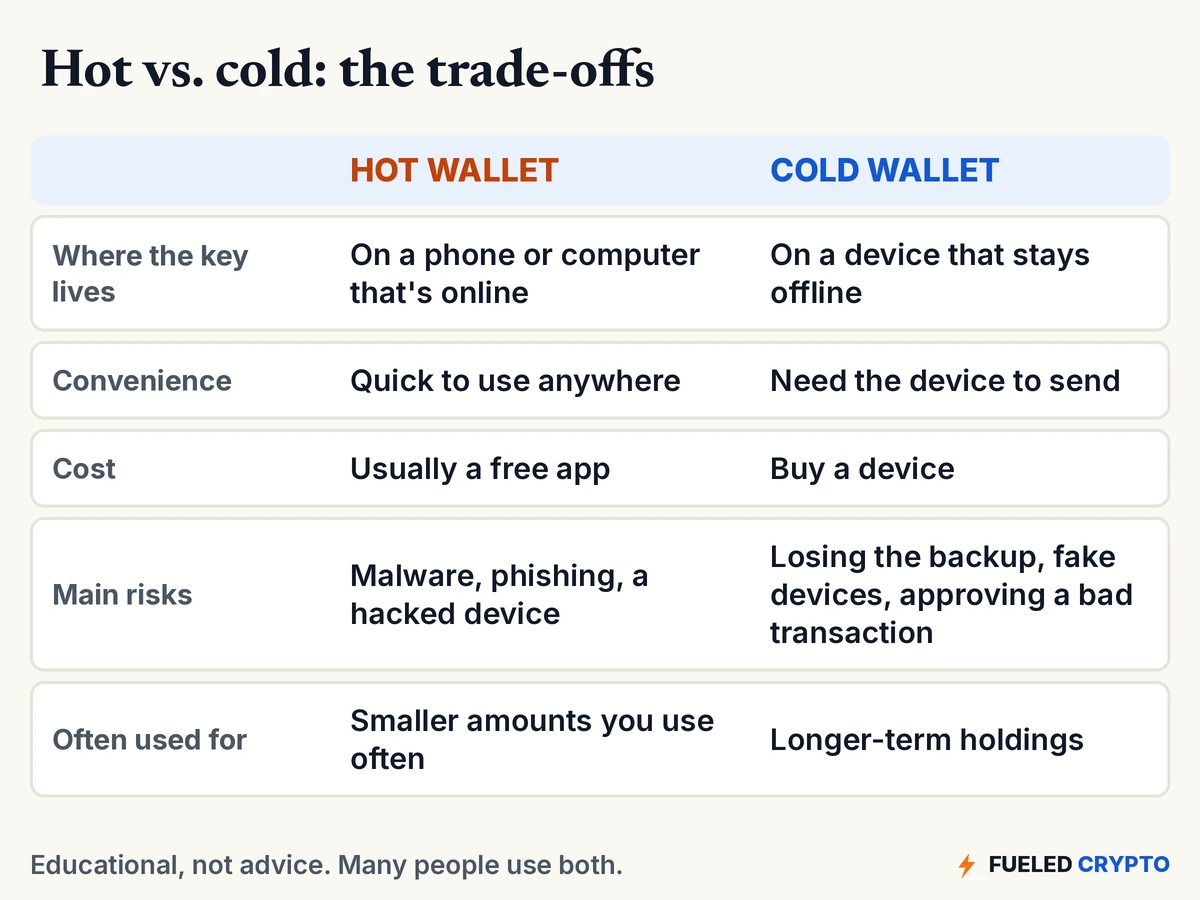
A few things worth knowing about each side:
- Hot wallets aren't careless by default. Plenty of people use them responsibly for small, everyday amounts. The risk is that anything that gets control of the device, or tricks you into typing your seed phrase somewhere, can get at the key (Bitcoin Developer Guide, ethereum.org: security).
- Cold wallets move the risk; they don't remove it. Your seed phrase is still the master key. ethereum.org puts it plainly: "Anyone who has it can access all of your accounts and drain every asset" (ethereum.org: security). How to store it is its own topic; see Seed Phrase Best Practices.
- The device screen is your last check. A hardware wallet signs what you approve. If a scam gets you to approve a bad transaction, the device can't tell your intent. That's why the details on the device screen are the ones to trust and read (Bitcoin Developer Guide).
- Where you buy the device matters. Our Hardware Wallet Setup Guide covers buying direct and checking the device before you use it.
The mistake that turns a cold wallet hot
Here's the one that catches people out. A hardware wallet's seed phrase can recreate its keys in any compatible wallet app. So if you ever type that seed phrase into a phone, a computer or a website, those keys now exist on an internet-connected device. Your "cold" wallet is effectively hot.
Trezor's own rule is short: "Never enter your wallet backup anywhere unless prompted by your Trezor device" (Trezor: how to use a wallet backup). ethereum.org adds that screenshots of a seed phrase "might sync them to a cloud data provider, which could make them accessible to hackers" (ethereum.org: security). And a "support agent" or website asking for your seed phrase is a scam every time. ethereum.org: "No legitimate service, support agent, or website will ever ask you for these" (same source). More red flags are in How to Avoid Crypto Scams.
Questions worth asking yourself
We can't tell you which setup is right for you, and nobody online should. But these questions make the choice a lot clearer.
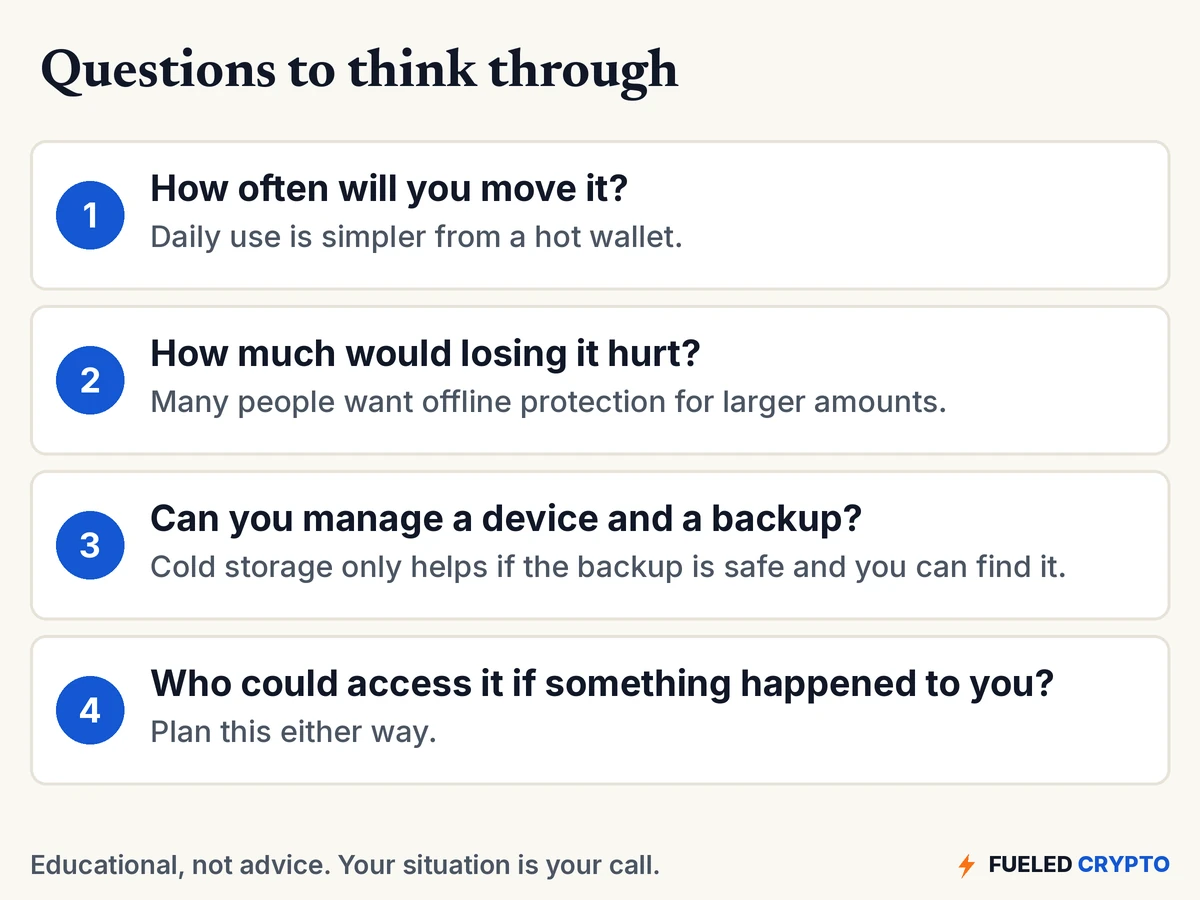
That last question gets skipped a lot. With self-custody, "there's no customer support," as ethereum.org puts it (ethereum.org: wallets), and that includes for your family. Our crypto estate planning guide covers it.
If you decide to move coins from an exchange to a hardware wallet, we have step-by-step guides for setting up the device and making the transfer. Our cold storage comparison looks at specific devices.
Common mix-ups
- "My coins are stored on my hardware wallet." They're on the blockchain. The device holds the key. Lose the device and your seed phrase can restore access on a new one (keys guide).
- "Cold means it never connects to anything." A hardware wallet does plug into or pair with your phone or computer. What stays offline is the private key, which never leaves the device.
- "An exchange account is a hot wallet." Not quite. It's custody: the exchange holds the keys. Whether they keep them hot or cold internally is their choice, not yours.
- "Hot wallets are unsafe." They carry more exposure, not certain loss. Many people use them for everyday amounts.
- "A cold wallet protects me from scams." It protects the key from malware. It can't stop you from approving a bad transaction or typing your seed phrase into a fake site.
Words you'll keep hearing
- Hot wallet: a wallet whose private keys live on an internet-connected device.
- Cold wallet / cold storage: keeping private keys on something that stays offline.
- Hardware wallet: a small device built only to store keys and sign transactions.
- Seed phrase (recovery phrase, wallet backup): the list of words that can recreate all your keys.
- Signing: using your private key to approve a transaction.
- Custodial: a company holds the keys for you, like an exchange.
- Self-custody: you hold the keys yourself, hot or cold.
Frequently asked questions
What is the difference between a hot wallet and a cold wallet? A hot wallet keeps your private keys on an internet-connected device, like a phone or browser app. A cold wallet keeps them offline, usually on a hardware wallet. Your coins stay on the blockchain either way.
Is a hardware wallet a cold wallet? Yes, in the usual sense. The private key stays on the device, which signs transactions after you approve them on its screen. Only the signed transaction goes back to your phone or computer.
Is a hot wallet safe? It's more exposed than a cold wallet because the key sits on an online device that malware or phishing could reach. Many people use hot wallets for smaller, everyday amounts.
Is an exchange account a hot wallet? Not exactly. On an exchange, the company holds the keys for you, which is custody. If the exchange runs into financial trouble, your funds could be at risk.
Can a cold wallet still be hacked or lost? The key is much harder to steal remotely, but you can still lose your seed phrase, buy a tampered device, or be tricked into approving a bad transaction or typing your seed phrase online.
What happens if I lose my hardware wallet? Your coins are on the blockchain, not the device. Your seed phrase can restore access on a new device. Without the seed phrase, there's usually no way back.
Do I need a cold wallet? That depends on your situation, and we don't give financial advice. Useful questions are how often you move the crypto, how much losing it would hurt, and whether you can safely manage a device and its backup.
Where to go next
- Keys, Addresses and Wallets, Explained: what a wallet really holds.
- How Crypto Transactions Work: signing, fees and confirmations.
- What Is Cryptocurrency, Really? and How a Blockchain Works: the basics underneath it all.
- Hardware Wallet Setup Guide and How to Move Crypto Off an Exchange to Cold Storage: the hands-on steps.
- Cold Storage Wallets Compared: specific devices side by side.
- Seed Phrase Best Practices and What to Do If Your Crypto Is Stolen.
Sources
- Bitcoin Developer Guide, Wallets (full-service wallets' main disadvantage, offline wallets, hardware wallet workflow and on-screen review).
- ethereum.org, Wallets (wallet types, exchange risk, "no customer support") and Security (hardware wallets, never share a recovery phrase, screenshots).
- ethereum.org, Ethereum accounts (keys and signing).
- Trezor, How to use a wallet backup (never enter a backup unless prompted by the device).
All diagrams and animations are original Fueled Crypto graphics.
Hardware Wallets: Common Options (Optional)
If you decide you want a hardware wallet, two safety basics come up again and again: buying straight from the manufacturer (or a seller it lists as authorized) and setting up a brand-new seed phrase yourself. Our Hardware Wallet Setup Guide covers the rest.
Ledger and Trezor are two common options if you decide you want one, and they aren't the only ones. These links go to each maker's official store: Ledger or Trezor. Each product is offered by its own company, which is responsible for it, so review the product and its terms yourself before choosing. Fueled Crypto may earn a commission if you buy through these links, at no extra cost to you. Typing ledger.com or trezor.io into your browser yourself gets you to the same place.
Fueled Crypto publishes news and education, not investment, tax, or legal advice. Crypto assets are volatile and can lose value. Do your own research and consider a licensed professional before making financial decisions. See our full disclaimer and affiliate disclosure.
Want plain-English crypto news once a week? Subscribe to Fueled Crypto.