Deck: Green and red bars, a strip of grey ones underneath, buttons that say 1H and 1D. Here's what a crypto price chart is actually showing you, with made-up examples, and what it can't tell you.
Last reviewed: October 24, 2026
The first crypto chart I opened looked like a barcode that had been in an accident. I didn't know what the colored boxes meant, why the thin lines stuck out of them, or why the same coin looked calm on one setting and wild on another.
This guide is about reading a chart, the same way you'd learn to read a weather map. It isn't about trading. There are no "buy when you see this" patterns here, because a chart records what already happened. It doesn't tell you what happens next. Every chart in this guide uses made-up prices.
The short version
- A chart is a price history. StockCharts' ChartSchool describes it as "a sequence of prices plotted over a specific timeframe." Time runs left to right; price runs bottom to top.
- Each candle sums up one period: the price it opened at, its high, its low and where it closed.
- The color usually shows direction for that period: often green if it closed higher than it opened, red if lower. Settings can change this.
- The timeframe button (15m, 1H, 1D and so on) sets how much time each candle covers. The same data looks very different zoomed in or out.
- Volume bars show how much traded in each period, not which way the price went.
- Linear and log scales show the same prices differently. Log scale is common on long-range crypto charts.
- Different sites can show slightly different prices, because they pull from different exchanges.
The two axes
Every price chart has two directions:
- Left to right is time. The newest data is usually on the right edge.
- Bottom to top is price. The numbers along the side (usually the right side) are the price scale.
A line chart is the simplest version. Fidelity's learning center says line charts "typically connect just the closing prices with a line to get a big picture view of price movement." It's a good way to see the general shape, but it hides what happened inside each period. That's what candles add.
How to read one candle
A candlestick packs four prices for one period into one shape:
- Open: the first price of the period.
- Close: the last price of the period.
- High: the highest price reached.
- Low: the lowest price reached.
StockCharts' ChartSchool explains the parts this way: the thick part is called "the body," and the thin lines above and below are "called 'shadows' (also referred to as 'wicks' and 'tails')." The body runs between the open and the close. The top of the upper wick is the high; the bottom of the lower wick is the low.
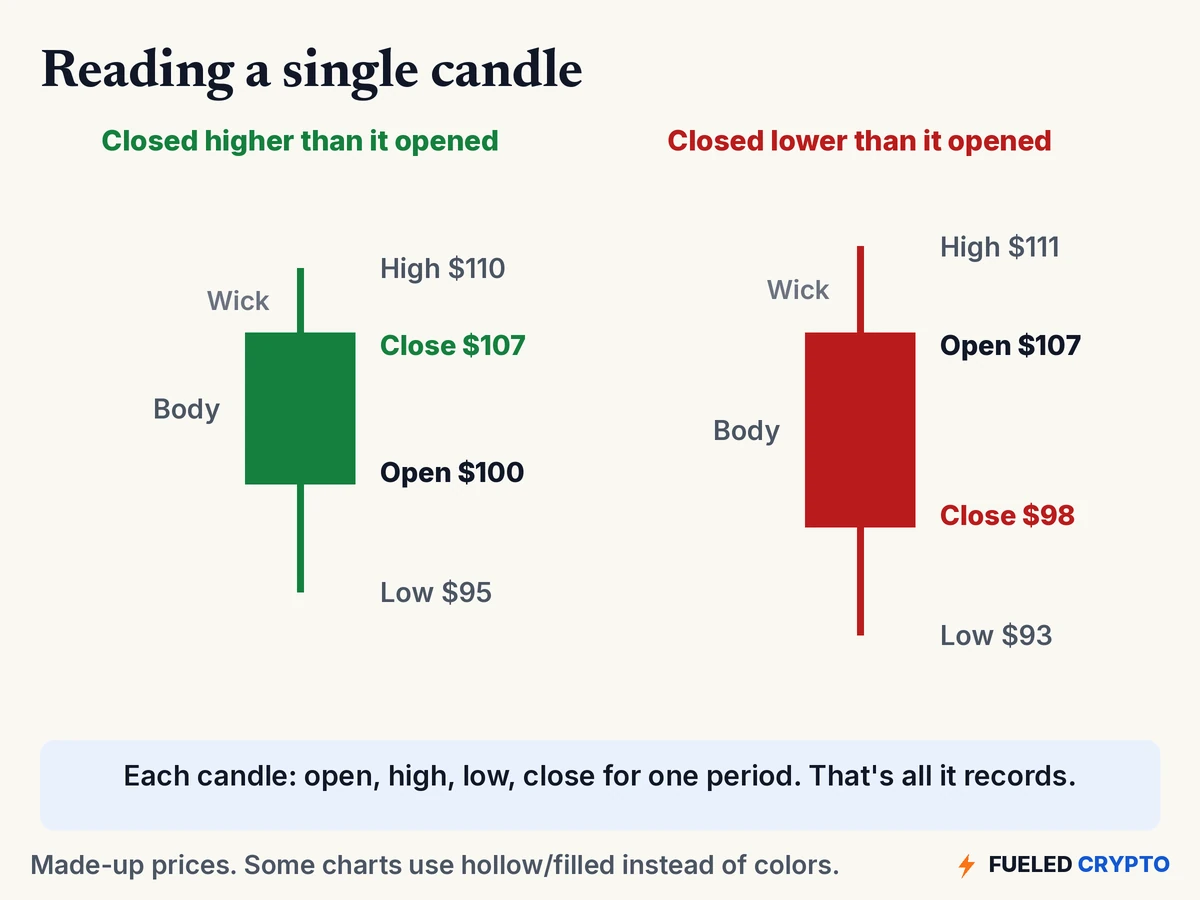
Color is the shortcut. On most default settings, a candle that closed higher than it opened is green, and one that closed lower is red. Fidelity puts it simply: the body "is usually green if the stock closes higher and red if it closes lower." Some charts use hollow and filled candles instead, and many apps let you change the colors. So I check the settings before trusting the color alone.
Here's how I read a single candle out loud, using the green one above: "This period opened at $100, dipped as low as $95, went as high as $110, and closed at $107." That's all a candle says. It's a summary, not a message.
Timeframes: the 15m, 1H and 1D buttons
Most charts have buttons like 5m, 15m, 1H, 4H, 1D and 1W. They set how much time each candle covers: 15 minutes, one hour, one day, one week.
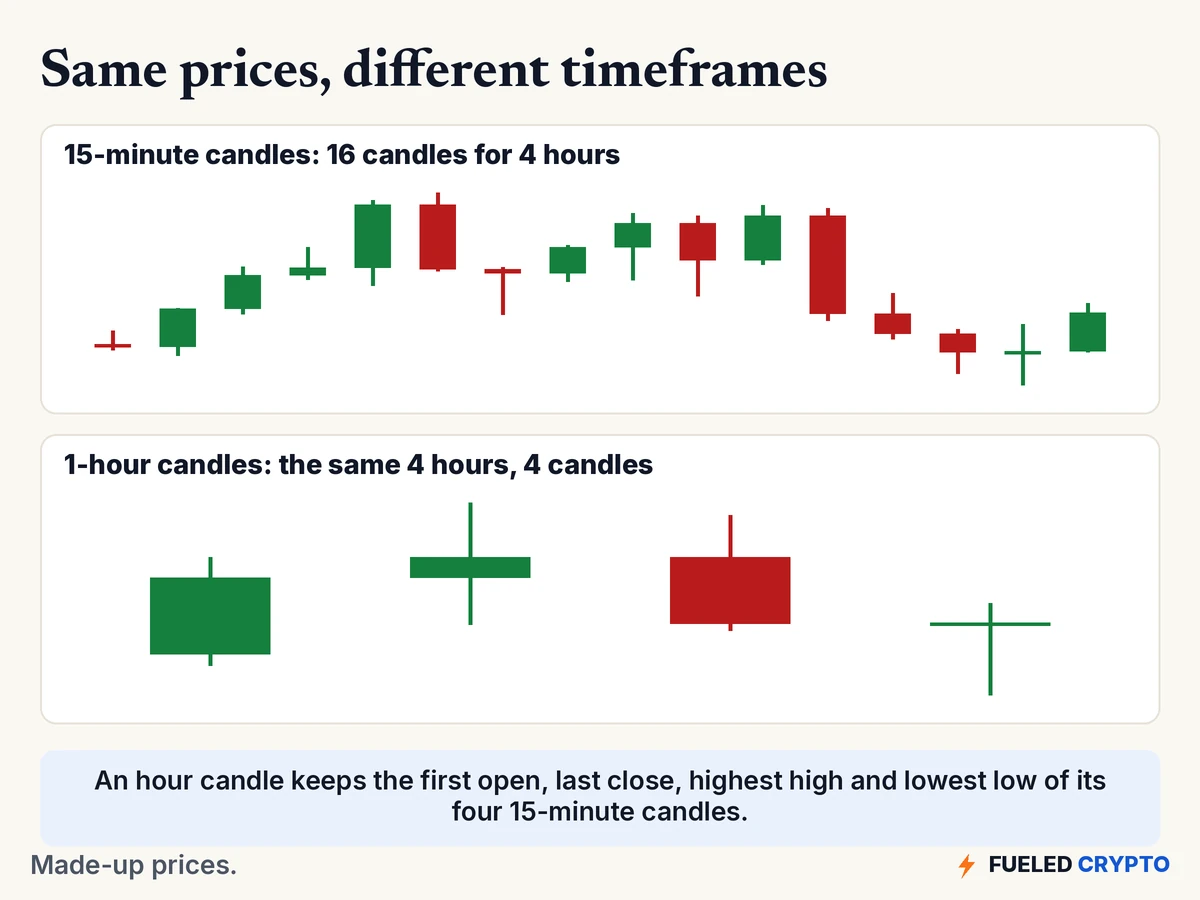
The diagram shows the same made-up four hours twice. On top, sixteen 15-minute candles. Below, four 1-hour candles. Each hourly candle keeps the first open, the last close, and the highest high and lowest low of the four shorter candles inside it.
ChartSchool puts the trade-off this way: "The less compressed the data, the more detail is displayed." Short timeframes show every wiggle. Long ones smooth the wiggles out and show the bigger picture. Neither is the "real" view. When a chart looks dramatic, the first thing I check now is which timeframe it's set to.
One crypto-specific thing to watch for: each chart site decides when its "day" starts and ends, often in a fixed time zone. So a daily candle on one site may not line up with a daily candle on another. If they don't match, the settings are a good place to look first.
Volume: the bars along the bottom
Under many price charts there's a row of bars. That's volume: how much of the coin traded during each period.
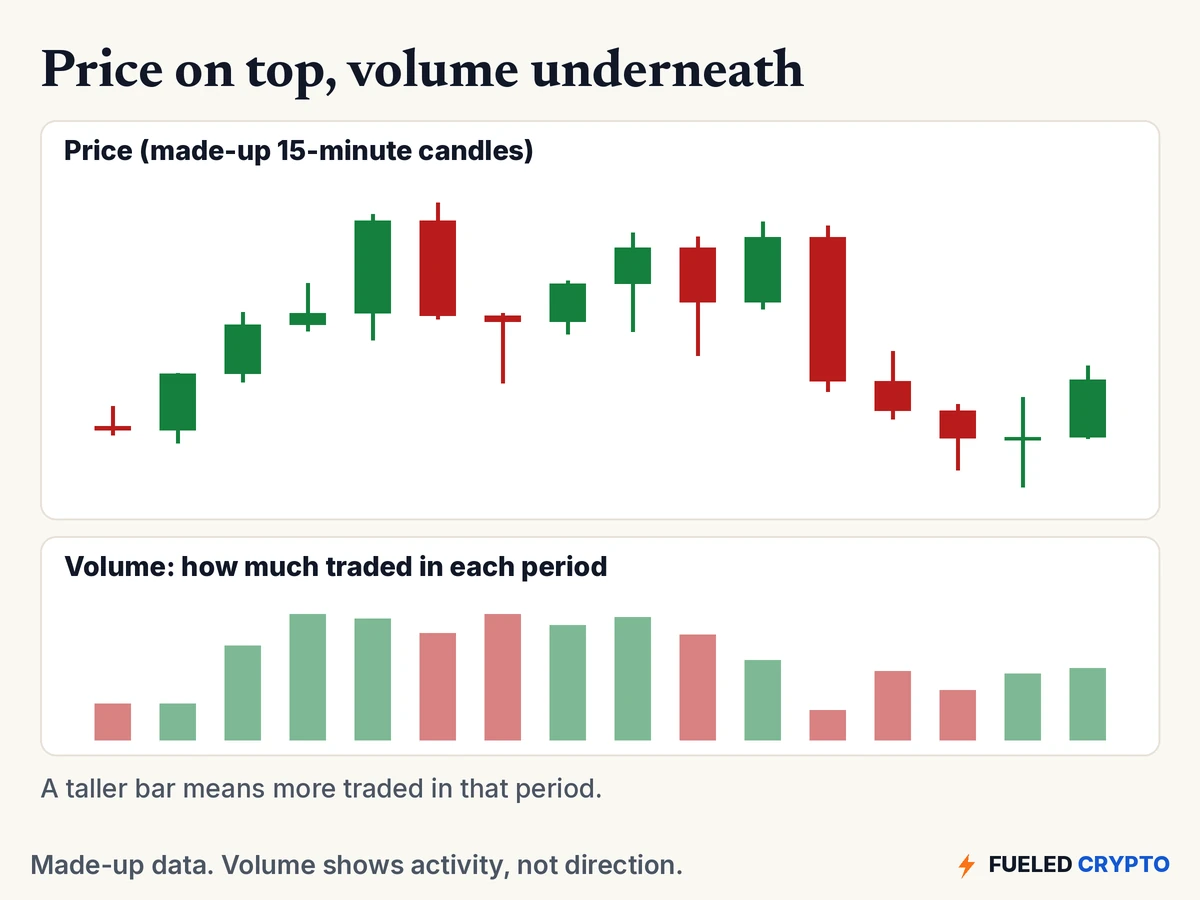
- A taller bar means more traded in that period. A shorter one means less.
- Many charts color each volume bar to match its candle. The color reflects the candle, not who was "winning."
- Volume shows activity, not direction.
Volume is also a reminder of something we covered in Market Cap, Supply and Tokenomics. When very little trades, a few orders can move the price a lot. The CFTC's list of digital asset risks notes that lightly traded assets "are also easier to manipulate."
On a coin's summary page, you'll often see "24h volume" as well. That's usually added up across many exchanges. CoinGecko, for example, describes its global 24-hour volume as "the sum of the trading volume of all exchanges" it tracks.
Linear vs. log scale
This setting confused me for a long time, and it changes how a chart feels more than almost anything else.
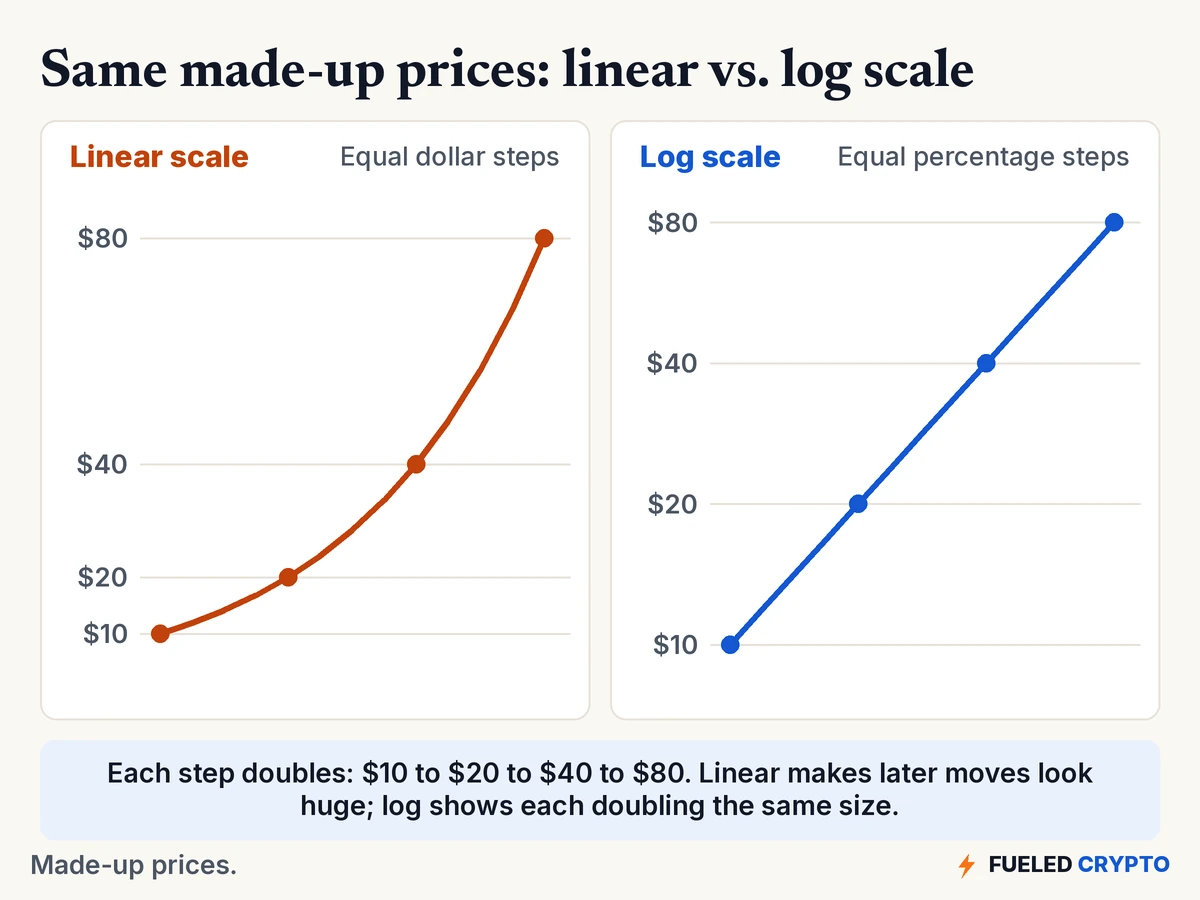
- Linear (also called arithmetic) scale: every dollar takes the same space. ChartSchool's example is a move from 10 to 20 looking "the same distance as the move from 70 to 80," even though the first is a 100% rise and the second is about 14%.
- Log scale: every percentage change takes the same space. ChartSchool notes that 10 to 20, 20 to 40 and 40 to 80 are all 100% increases, so "all three advances would appear as the same vertical distance." Many apps call this "semi-log" or just "log."
In the made-up example, the price doubles three times. On a linear scale, the last doubling looks enormous and the first looks like nothing. On a log scale, they're all the same size. Same data, different picture.
Crypto prices can move a long way over a few years, so long-range crypto charts are often shown on a log scale. If a chart covers years, I glance at the price labels on the side. If the gaps go 10, 100, 1,000 instead of 10, 20, 30, it's log.
Why prices differ from site to site
There isn't one official crypto price. Each exchange has its own buyers and sellers, so prices can differ a little between them. Price-tracking sites combine many of those into one number. CoinGecko says it aggregates "price, volume, and liquidity data across all tickers on all exchanges" it integrates with, and calculates a volume-weighted average.
So a coin can show slightly different prices on an exchange's app, a tracker site and a news ticker at the same moment. Small gaps are normal. The price you actually get depends on where you trade and on that platform's fees.
What a chart can't tell you
This is the part I wish I'd heard first.
- It can't tell you what happens next. A chart is a record of past trades. The CFTC's risk list says many digital assets "are difficult to value," and that uncertainty, sentiment, the economy, "or even a social media comment" can move them sharply.
- It can't tell you why. News, outages, large holders moving coins, or a handful of trades in a quiet market can all leave the same shape.
- It can't vouch for the platform showing it. The CFTC warns: "Fraudulent platforms can also control what you see on their websites or trading apps." A chart on an unfamiliar site is not proof that anything is real. Our How to Avoid Crypto Scams guide covers the warning signs.
You'll see people online draw lines and shapes on charts and give them names. That's a whole field called technical analysis, and it's outside what this guide covers. Here, the goal is just to read what's on the screen.
Common mix-ups
- "Green means good, red means bad." Color only says whether that one period closed above or below where it opened. And settings can swap the colors.
- "A huge candle means something big happened." Maybe. Or the timeframe is long, or the scale is linear on a chart covering years.
- "High volume means the price is going up." Volume measures how much traded, not which way.
- "The chart is wrong because it doesn't match my app." Different sites use different exchanges, time zones and averaging.
- "This shape happened before, so it'll happen again." A chart records the past. It doesn't promise a repeat.
Words you'll keep hearing
- Candlestick (candle): a shape showing one period's open, high, low and close.
- OHLC: open, high, low, close.
- Body: the thick part of a candle, between the open and close.
- Wick (shadow, tail): the thin lines marking the high and low.
- Timeframe (interval): how much time each candle covers.
- Volume: how much traded during a period.
- Linear scale: equal dollar moves take equal space.
- Log (semi-log) scale: equal percentage moves take equal space.
- Trading pair: what a coin is priced in, such as a made-up "ABC/USD" (ABC priced in dollars).
Frequently asked questions
How do you read a candlestick chart? Each candle covers one period. The body runs from the open to the close, and the thin wicks mark the highest and lowest prices. On most settings, green means it closed higher than it opened, and red means lower.
What do the green and red candles mean on a crypto chart? Usually, green means that period closed above its opening price and red means it closed below. Some charts use hollow and filled candles instead, and colors can be changed in settings.
What do 1H, 4H and 1D mean on a chart? They're timeframes. Each candle covers one hour, four hours or one day. Longer timeframes combine shorter candles into fewer, bigger ones.
What is volume on a crypto chart? It's how much of the coin traded during each period, usually shown as bars under the price. It measures activity, not whether the price went up or down.
Should I use a log or linear chart? They show the same data in different ways. Linear gives equal space to equal dollar moves; log gives equal space to equal percentage moves. Log is common on long-range crypto charts because prices can move a long way.
Why is the crypto price different on different websites? Each exchange has its own trades, and tracking sites average many exchanges together. Small differences between sites at the same moment are normal.
Can a price chart predict where the price will go? No. A chart shows what already happened. Regulators note that crypto prices can swing sharply on sentiment, news, or "even a social media comment."
Where to go next
- Market Cap, Supply and Tokenomics, for the other numbers on a price page.
- Crypto Market Cycles, for the bigger picture of how crypto markets have moved over time.
- How to Avoid Exchange Outages During Peak Volatility, for what busy market days can look like on platforms.
- How to Avoid Crypto Scams, since fake charts and fake profits are a common scam tool.
- Crypto Glossary, for any other term.
Sources
- StockCharts ChartSchool: What Are Charts? (definition, timeframes, arithmetic vs. log scale), Introduction to Candlesticks (body, shadows/wicks).
- Fidelity Learning Center: What is technical trading and how does it work? (line charts, candle colors). Cited only for chart definitions.
- CoinGecko: Methodology (aggregated price, global 24-hour volume).
- CFTC: 14 Digital Asset Risks to Remember (volatility, liquidity, manipulated data).
All charts, diagrams and animations are original Fueled Crypto graphics using made-up prices. No real coin's data is shown.
Fueled Crypto publishes news and education, not investment, tax, or legal advice. Crypto assets are volatile and can lose value. Do your own research and consider a licensed professional before making financial decisions. See our full disclaimer.
Want plain-English crypto news once a week? Subscribe to Fueled Crypto.