Deck: If you keep crypto on an exchange, your login is the front door. Here's how to make it much harder to open: stronger two-factor, a locked-down email, and a phone number that can't be quietly stolen.
Last reviewed: October 24, 2026
When people picture crypto theft, they often imagine some clever hack of the blockchain itself. A lot of the time it's more ordinary than that. Someone gets your password, or your email, or your phone number, and logs in as you.
The good news is that most of the fixes are settings you can turn on in an afternoon. None of this needs any particular product. It's about how you sign in and what can reset your account. (If you're not sure whether to keep coins on an exchange at all, Exchanges vs. Self-Custody walks through that choice.)
The short version
- Use a long, unique password for your exchange, ideally stored in a password manager.
- Turn on two-factor authentication (2FA). If you can choose, an authenticator app beats text messages, and a security key or passkey beats both.
- Lock down your email. Whoever controls your inbox can often reset your other passwords.
- Protect your phone number with a carrier PIN or account lock, because of SIM swaps.
- Never share a login code with anyone who contacts you, no matter the story.
- Check your recovery settings and keep backup codes somewhere safe and offline.
Why a password isn't enough
A password is "something you know," and other people can come to know it too. The FTC lists the usual ways: phishing pages that trick you into typing it, passwords leaked in data breaches, and reused passwords that get tried on other sites.
Two-factor authentication adds a second, different kind of proof, usually "something you have" (like your phone or a physical key) or "something you are" (like a fingerprint). The FTC compares it to putting a second lock on your front door: even with your password, a thief still needs the second factor.
But the second factor isn't all equally strong. That's where most of the real choices are.
The SIM swap: why text codes are the weak spot
Your phone number isn't really tied to your phone. It's tied to a SIM, and your mobile carrier decides which SIM gets it. In a SIM swap, a scammer convinces the carrier to move your number to a SIM they control.
The FBI describes how it usually happens: a criminal impersonates the victim and tricks the carrier, bribes a carrier employee, or uses phishing against carrier staff. Once the number moves, "the victim's calls, texts, and other data are diverted to the criminal's device." The criminal can then hit "Forgot password" on your accounts and receive the reset codes by text.
This isn't a rare edge case. In a 2022 public service announcement, the FBI said its Internet Crime Complaint Center received 1,611 SIM swapping complaints in 2021, with adjusted losses of more than $68 million, up from 320 complaints and about $12 million across 2018 to 2020. The FBI was specifically warning about theft from both bank and crypto accounts.
Warning signs the FTC points to: your phone suddenly has no service for calls, texts or data, or your carrier notifies you that your SIM was activated on a new device. If that happens out of the blue, contact your carrier right away from another phone.
How to protect your number
- Set a PIN or password on your mobile account. The FTC suggests this to help block unauthorized changes. Your carrier's website explains how.
- Ask about a SIM or port-out lock. In November 2023, the FCC adopted rules requiring wireless carriers to use secure ways to confirm it's really you before moving your number to a new SIM or a new carrier, to notify you of those requests, and to offer the option of locking your account against them. Ask your carrier what it offers.
- Share less in public. The FBI suggests not advertising that you own crypto, and not posting your phone number or other personal details online.
- Move your exchange login off text codes if the exchange allows it. That's the next section.
Choosing your second factor
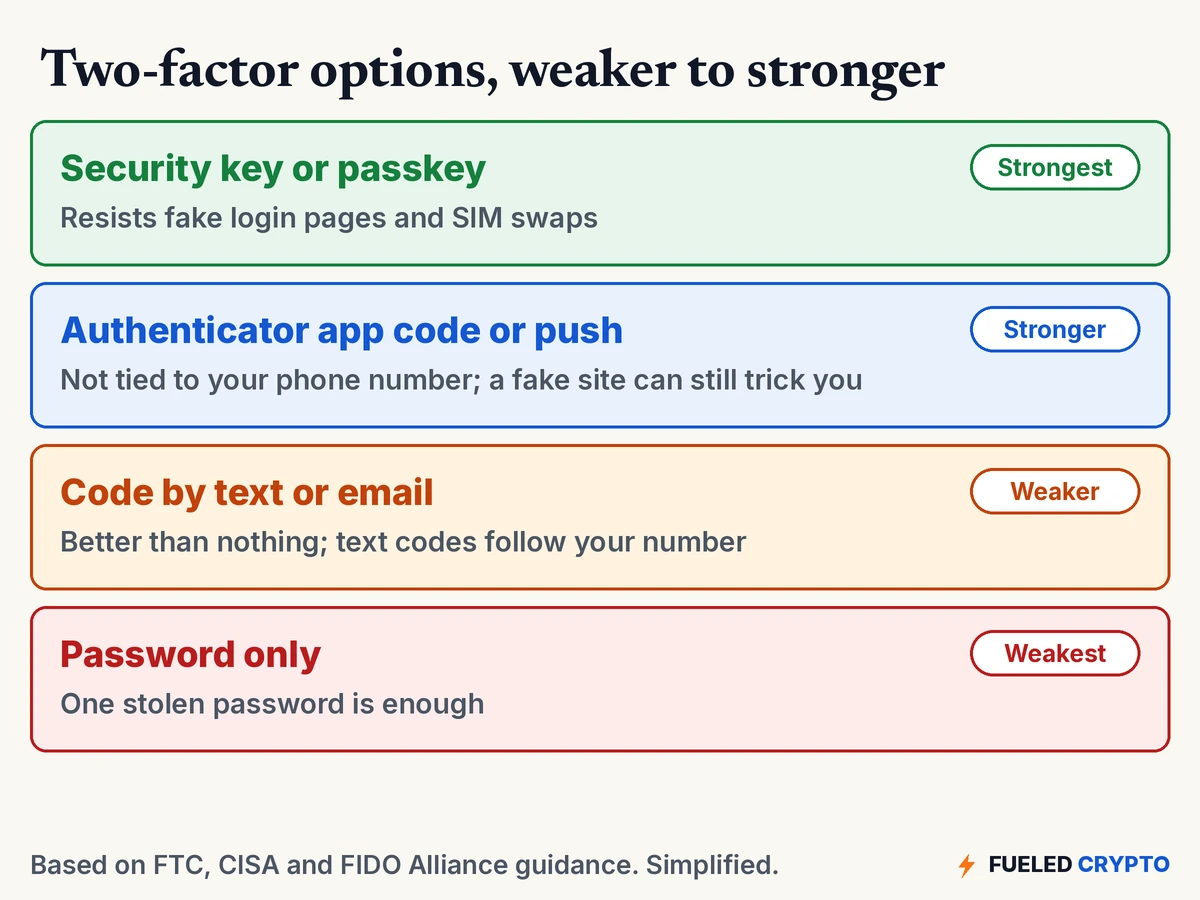
Here's how the common options compare, based on FTC and CISA guidance. Exchanges differ in which ones they support, so check your account's security settings.
Codes by text message or email. Easy, and the FTC says that if it's the only option, "it's better than nothing." But text codes can be grabbed through a SIM swap, and email codes are only as safe as your email.
Authenticator apps. These are free apps on your phone that generate short-lived login codes, or send you a push prompt to approve. Common options come from the big phone and software makers and from password-manager companies. Because the code is made on your device, not sent to your number, the FTC notes it "isn't susceptible to a SIM card swap attack." The catch: CISA points out that a convincing fake login page can still ask you for the code and pass it along to the real site.
Security keys and passkeys. A security key is a small physical device that plugs in or taps your phone. A passkey is a sign-in credential stored on your phone, computer or a security key, unlocked the same way you unlock the device. Both are built on FIDO standards. CISA calls FIDO "the only widely available phishing-resistant authentication," because it checks that it's talking to the real website. A look-alike site simply gets nothing. The FTC calls security keys "the strongest method of two-factor authentication."
A few practical notes, whichever you pick:
- Have a backup. Many services give you one-time backup codes when you turn on 2FA. Write them down or print them, and keep them somewhere safe and offline, not in a screenshot. If you use a security key, registering a spare (where the exchange allows it) means losing one doesn't lock you out.
- Push prompts you didn't expect are a red flag. CISA warns about "push bombing," where attackers send prompt after prompt hoping you'll tap Approve to make them stop. If you didn't just try to log in, deny it and change your password.
- Never read a code to anyone. The FTC's rule is simple: don't share your verification code with someone if you didn't contact them first.
Your email is the master key
Here's the part a lot of people skip. Your exchange account trusts your email. If you forget your password, the reset link goes to your inbox. So, as the FTC puts it, someone who hacked your email could "request a password reset link for any of your other accounts."
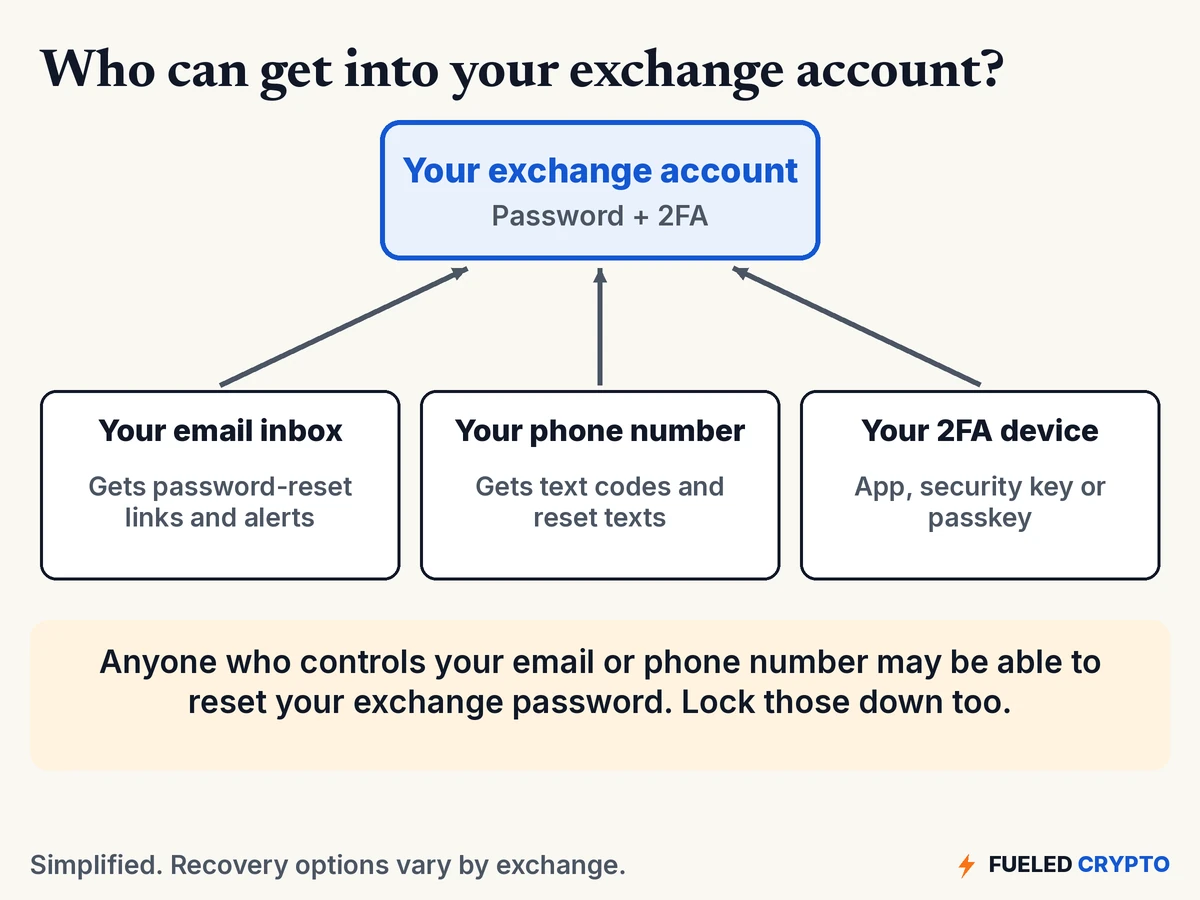
To lock down the email address your exchange uses:
- Give it its own strong, unique password and its own 2FA, ideally an app, key or passkey rather than text.
- Check its recovery email and phone number. The FTC suggests making sure they're ones you entered and still control.
- Look for forwarding rules you didn't create. A quiet rule that copies your mail to someone else is a known sign of a hacked account. Delete any you don't recognize.
- Some people use a separate email address only for financial accounts. It's optional, but it keeps that address out of everyday shopping and newsletter sign-ups.
The lock-down checklist
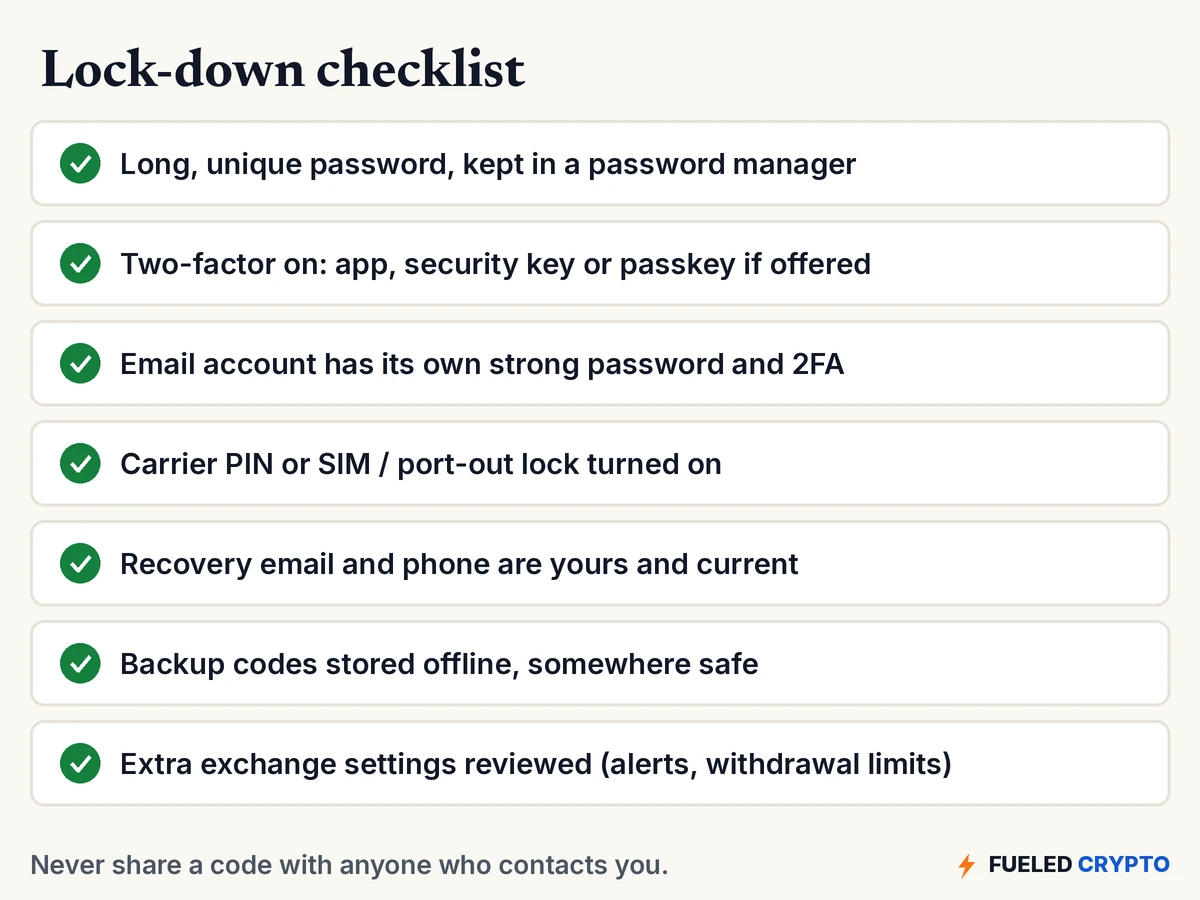
- Password. Long, random and used nowhere else. CISA's tips are to make passwords at least 16 characters, random and unique, and to let a password manager create and remember them. Many phones and browsers include one, and standalone password managers are common options too.
- Two-factor. Turn it on, then switch to the strongest method your exchange supports.
- Email. Same treatment: unique password, strong 2FA, recovery info checked, no strange forwarding.
- Phone number. Carrier PIN or password set, plus any SIM or port-out lock your carrier offers.
- Recovery info. Make sure your exchange's recovery email and phone are current and yours.
- Backup codes. Saved offline, in a place you'll still find in a year.
- Extra exchange settings. Some exchanges offer login and withdrawal alerts, a list of approved withdrawal addresses, a waiting period for new addresses, or a personal "anti-phishing" phrase that appears in their real emails. Look through your account's security page and turn on what fits.
One more habit: get to your exchange by typing the address yourself or using a bookmark, not by tapping links in emails, texts or ads. Our How to Avoid Crypto Scams guide covers the look-alike sites and fake support agents that try to catch you there.
If something already looks wrong
If your phone suddenly loses service, you get a login alert you don't recognize, or your password stops working, move fast. The FBI's list for SIM swap victims starts with:
- Call your carrier to get your phone number back.
- Change your passwords, starting with email and your exchange, once you're back in control.
- Contact your financial accounts, including your exchange through its official website or app, to flag suspicious logins and withdrawals.
- Report it to local law enforcement and to the FBI's Internet Crime Complaint Center at ic3.gov.
Our Crypto Stolen? What to Do Right Now guide goes through those steps in more detail, including recovery scams that target people right after a theft.
Common mix-ups
"I turned on 2FA, so I'm covered." It helps a lot, but text-message codes can still be taken through a SIM swap, and app codes can still be typed into a fake site. The method matters.
"Nobody would bother stealing my phone number." Anyone with crypto can be a target. The FBI's first tip in its SIM swap warning is not to advertise that you own it.
"The person on the phone is from support, so I can give them the code." A login code is the key itself. The FTC's guidance is not to share it with anyone who contacted you first, whatever the reason they give.
"My exchange account is separate from my email." Not really. If your email can reset your exchange password, the two are linked, and the weaker one sets the level of protection.
"This also protects my self-custody wallet." It doesn't. Exchange logins and wallet keys are different things. For a wallet you hold yourself, the risks and fixes are in Seed Phrase Best Practices and Crypto Wallets, Keys and Addresses Explained.
Words you'll keep hearing
- 2FA / MFA: two-factor or multi-factor authentication. Signing in with a second, different kind of proof besides your password.
- SIM: the chip or eSIM profile that connects your phone to your carrier and your phone number.
- SIM swap: a scam where someone gets your carrier to move your number to their SIM.
- Port-out fraud: a similar scam where someone moves your number to an account at a different carrier.
- Authenticator app: an app that makes short-lived login codes or push prompts on your device.
- Security key: a small physical device used to sign in. It works over USB or a tap (NFC).
- Passkey: a sign-in credential built on FIDO standards, stored on your device or a security key, and unlocked with your fingerprint, face, PIN or pattern.
- Phishing: a fake message or website made to trick you into handing over a password or code.
- Backup codes: one-time codes you can use to get in if you lose your 2FA device.
Frequently asked questions
What is two-factor authentication? It's a sign-in that needs two different kinds of proof, usually your password plus something you have, like a code from your phone or a security key. Even if someone steals your password, they still need the second factor.
Is text-message 2FA safe enough for a crypto exchange? It's better than no 2FA, but it's the weakest common option, because a SIM swap can send your texts to someone else. The FTC and FBI both point to authenticator apps and security keys as stronger choices where they're offered.
What is a SIM swap? A scam where someone convinces your mobile carrier to move your phone number to a SIM they control. They then get your calls and texts, including login and password-reset codes.
How can I protect my phone number from a SIM swap? Set a PIN or password on your mobile account, ask your carrier about a SIM or port-out lock, avoid posting your number or crypto holdings publicly, and move important logins off text-message codes.
What is a passkey? A passkey is a sign-in credential based on FIDO standards. It's stored on your phone, computer or a security key and unlocked the same way you unlock the device. Passkeys are designed to resist phishing because they only work with the real website.
Is an authenticator app or a security key safer? Both are stronger than text codes. Security keys and passkeys go a step further because they resist fake login pages, which app codes don't. Many people use whichever their exchange supports and keep a backup method set up.
Why does my email matter for my exchange account? Password-reset links usually go to your email. Anyone who gets into your inbox may be able to reset your exchange password, so your email needs its own strong password and 2FA.
Where to go next
- How to Avoid Crypto Scams and Crypto Stolen? What to Do Right Now.
- Exchanges vs. Self-Custody, on what you're trusting an exchange to do.
- Seed Phrase Best Practices, if you hold your own wallet.
Sources
- FTC Consumer Advice: Use Two-Factor Authentication To Protect Your Accounts, SIM Swap Scams: How to Protect Yourself (Oct. 23, 2019), How To Recover Your Hacked Email or Social Media Account.
- FBI Internet Crime Complaint Center: Criminals Increasing SIM Swap Schemes to Steal Millions of Dollars from US Public (PSA I-020822-PSA, Feb. 8, 2022).
- FCC: FCC Adopts Rules to Protect Consumers' Cell Phone Accounts (Nov. 15, 2023) and the Report and Order, FCC 23-95 (account locks for SIM changes and port-outs).
- CISA: More than a Password (MFA), Implementing Phishing-Resistant MFA fact sheet, Use Strong Passwords.
- FIDO Alliance: Passkeys.
All diagrams and animations are original Fueled Crypto graphics. Names, numbers and codes in the animation are made up.
Fueled Crypto publishes news and education, not investment, tax, or legal advice. Crypto assets are volatile and can lose value. Do your own research and consider a licensed professional before making financial decisions. See our full disclaimer.
Want plain-English crypto news once a week? Subscribe to Fueled Crypto.