Deck: "Connect wallet" sounds harmless, and on its own it mostly is. The part that matters comes after: the approvals and signatures that can let a piece of code move your tokens later. Here's how to tell them apart.
Last reviewed: October 24, 2026
If you've used a crypto app outside of an exchange, you've probably seen it: a big Connect wallet button, then a pop-up in your wallet asking you to confirm something. It's easy to click through. Most of the time, nothing bad happens.
But not all crypto theft involves stealing a seed phrase. One scam that U.S. law enforcement has warned about works by getting a person to approve something. This guide walks through what each kind of wallet request actually does, why "unlimited" approvals matter, and how to check and cancel permissions you've already given. It doesn't recommend any app or tool, and it isn't about earning yield.
The short version
- Connecting a wallet shares your address with a website and lets it send requests to your wallet. On its own, it doesn't let the site move anything.
- Approving a token gives a smart contract permission to move that token from your wallet, up to a limit. That permission stays in place until you change it, even if you disconnect.
- "Unlimited" approvals are common because they save fees, but they let the contract take every unit of that token you hold, now or later.
- Some signatures can work like approvals. A "permit" signature can grant spending permission without a transaction or a fee.
- You can review and revoke approvals. Revoking is a small on-chain transaction and doesn't affect positions you already have in an app.
First, what is DeFi?
DeFi, short for decentralized finance, is the name for financial apps that run on smart contracts: programs that live on a blockchain like Ethereum and run exactly as written. People use them to swap one token for another, lend, borrow and more, using a self-custody wallet instead of an account at a company. (If you're new to wallets, start with Crypto Wallets, Keys and Addresses Explained. For more on smart contracts, see What Is Ethereum?)
That design has a trade-off. There's usually no company holding your funds, but there's also no help desk that can reverse a mistake. When you use a DeFi app, the main thing standing between your tokens and everyone else is what you agree to in your wallet. That's why it pays to understand the prompts.
This guide uses Ethereum-style wallets and tokens as the example, because that's where these ideas are most widespread. Other networks have similar features under different names. On Solana, for example, a token account owner can "delegate" authority over some tokens to someone else and revoke it later.
Connect, sign, approve: four different things
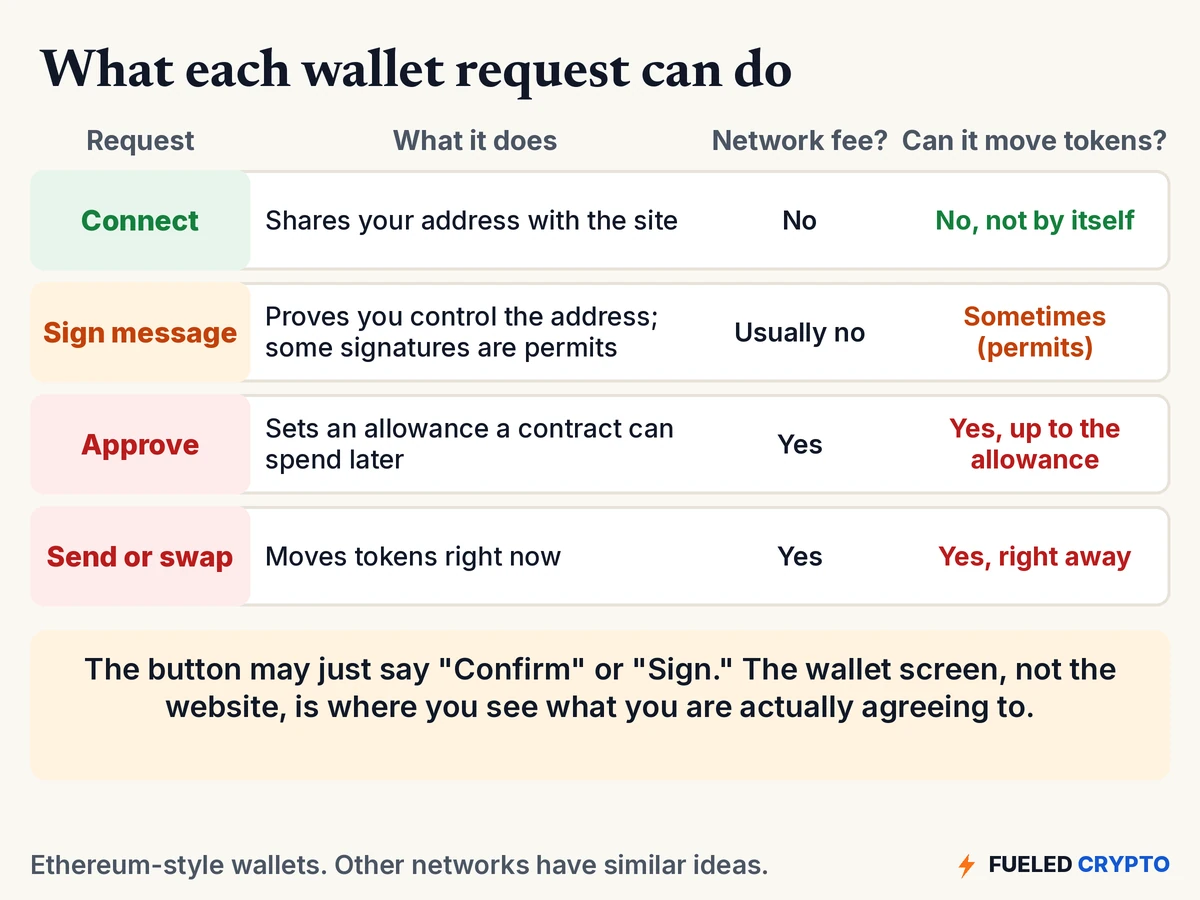
When you use a crypto app, your wallet can show you a few different kinds of requests. They can look alike, and the button often just says "Confirm." But they do very different things.
1. Connect
Clicking Connect lets the website see your wallet address and send requests to your wallet. Ethereum.org's beginner guide describes it as selecting your wallet and confirming a request, and notes that this step "should not require spending any ETH."
What the site gains: your address, and with it your public balances and history, since those are visible on the blockchain anyway. What it doesn't gain: the ability to move your tokens. For that, it has to ask again, and you have to say yes.
2. Sign a message
Sometimes a site asks you to sign a message instead of sending a transaction. Signing doesn't use a network fee, and it often serves as a login: it proves you control the address. There's even a standard for this, called Sign-In with Ethereum.
But not every signature is a login. Some token contracts support a permit, a signed message that sets a spending allowance without a separate transaction. The token standard that defines it, ERC-2612, describes it as letting users change their allowance "using a signed message." In other words, a free, quick-looking signature can sometimes grant the same permission as an approval. So it's worth reading what a signature request says before you sign.
3. Approve
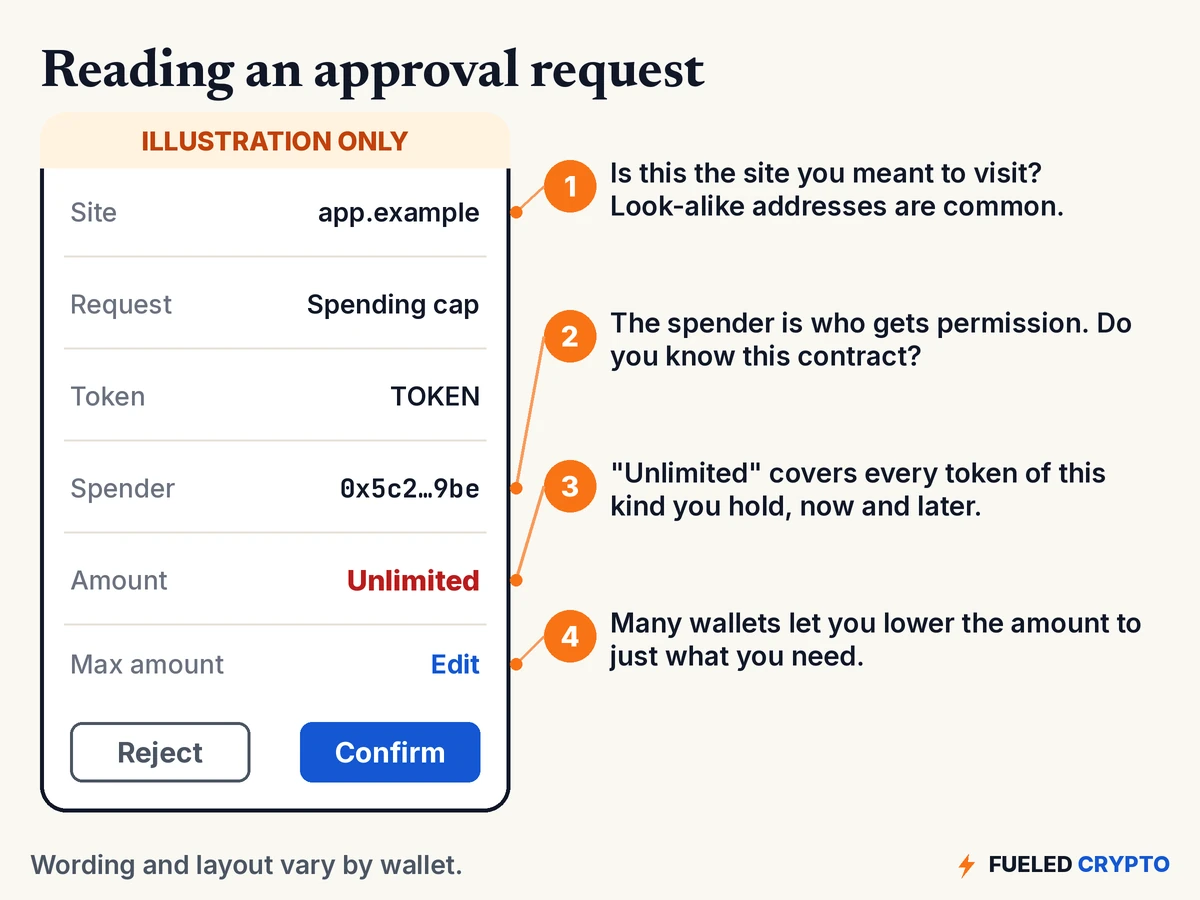
An approval is a real blockchain transaction, with a small network fee, that sets an allowance: how much of a particular token a particular contract (the "spender") may move out of your wallet.
This is how most DeFi apps work. In the ERC-20 token standard, approve "allows _spender to withdraw from your account multiple times, up to the _value amount," and a separate function lets that contract "transfer tokens on your behalf." So when you swap on a decentralized exchange, you usually approve first, and then the app's contract pulls the tokens it needs.
NFTs have a broader version. The NFT standard (ERC-721) lets you set an "operator" who can manage all of your NFTs from a collection, not just one. In wallets it often appears as something like "set approval for all."
4. Send or swap
This is the one most people expect: a transaction that moves tokens right now, to a person or into a contract. It costs a fee, and once it's confirmed, it can't be undone. (More on that in How Crypto Transactions Work.)
Why "unlimited" approvals matter
Many apps ask for an unlimited allowance by default. There's a practical reason. Ethereum.org explains that projects do this so users only have to approve once and pay the fee once, rather than every time.
The catch is that an unlimited approval covers every unit of that token you hold, including tokens you receive later. And it doesn't go away on its own. Ethereum.org's guide puts it plainly: "There are no expiration dates on contract permissions." It also warns that disconnecting your wallet from a site doesn't remove the permission. If you've approved a token, the contract "can still use those tokens."
Most of the time that's fine, because the contract does only what it's built to do. The risk shows up when:
- the contract was malicious from the start, such as a fake site built to collect approvals;
- a legitimate contract gets exploited. The FBI has warned that criminals increasingly exploit vulnerabilities in DeFi smart contracts to steal funds; or
- you approved something you didn't mean to, because the request looked like a routine "Confirm."
Many wallets now let you set a smaller spending cap on the approval screen. Ethereum.org's security guide suggests setting limits "to only the amount necessary for the transaction."
Approval phishing: the scam built on this
Because approvals are so powerful, scammers target them. The U.S. Secret Service calls this approval phishing: "a scam designed to trick you into unknowingly granting full access to your cryptocurrency wallet."
According to the Secret Service, it usually works like this:
- You get a pop-up, alert or link that appears to come from a trusted app or service.
- It asks you to "approve" something. It might be framed as claiming a reward, fixing an account, verifying your wallet or joining an investment.
- You approve. The contract you approved belongs to the scammers, who then move the tokens out. Those transfers can't be reversed.
These scams are often tied to investment-fraud schemes, where someone builds trust over time before steering you to a fake platform. They also show up as surprise "airdrops," where tokens you didn't ask for appear in your wallet with a link to "claim" more. For the wider picture, see How to Avoid Crypto Scams.
How to check and revoke approvals
You can see which contracts you've approved and cancel them.
- Find an approval checker. Some block explorers (websites that show blockchain data) and standalone tools list the token approvals tied to an address. Ethereum.org's revoke guide points to several common options. Get to any tool by typing its address yourself, because fake "revoke" sites exist too.
- Check you're on the right network. Approvals are per network. An approval on Ethereum won't show up when you're looking at a different network.
- Look at each spender and amount. Pay particular attention to unlimited approvals and to contracts you don't recognize or no longer use.
- Revoke. Revoking sends a transaction that sets the allowance back to zero, so you'll pay a small network fee. Your wallet will ask you to confirm it like any other transaction.
Two reassurances from ethereum.org: revoking "should never result in a loss of funds," and it doesn't close positions you already hold in an app. You'll just need to approve again the next time you use that app.
If you think an approval has already been abused, act fast. Our guide Crypto Stolen? What to Do Right Now covers revoking, moving what's left, and reporting.
Habits that help
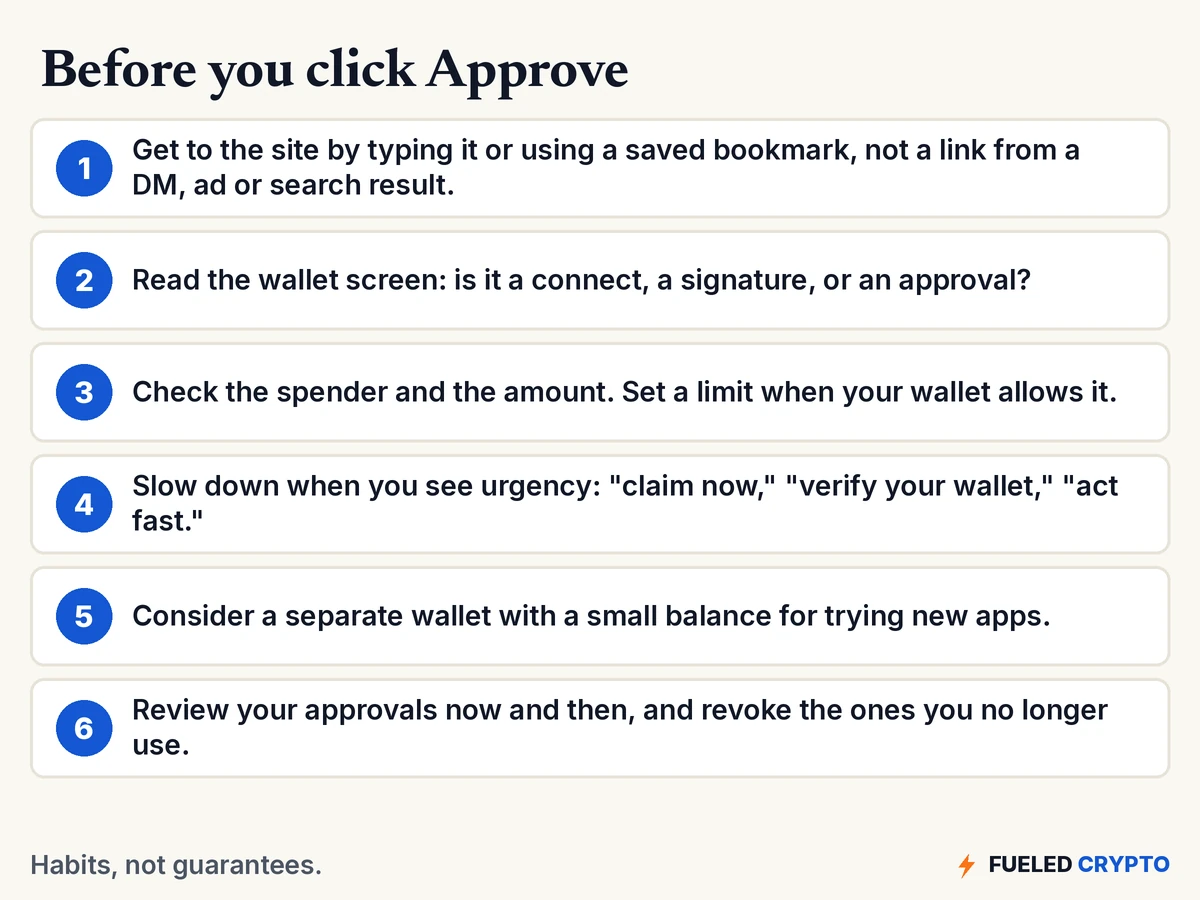
None of these is a guarantee. They're habits that make the common tricks less likely to work:
- Arrive on your own. Type the site's address or use a bookmark you saved. Links in DMs, replies, ads and even search results are common ways scammers send people to look-alike sites.
- Read the wallet, not the website. A site can say anything. Your wallet's pop-up shows what you're actually signing or approving.
- Match the request to what you're doing. Logging in shouldn't need an approval. Viewing a page shouldn't need a signature that mentions spending.
- Treat urgency as a warning. "Claim in the next 10 minutes" or "verify your wallet or lose access" is pressure, not information.
- Keep experiments separate. Some people keep most of their crypto in one wallet they rarely connect to anything, and use a second wallet with a small balance for trying new apps. (Our guide Hot vs. Cold Wallets covers the trade-offs.)
- Do an occasional cleanup. Every so often, review your approvals and revoke the ones you no longer use.
And the oldest rule still applies: no legitimate app needs your seed phrase. See Seed Phrase Best Practices.
Common mix-ups
- "Disconnecting removes access." It doesn't. Disconnecting stops the site from sending new requests. Approvals stay until you revoke them.
- "Signing is free, so it's harmless." Many signatures are just logins, but a permit signature can grant spending permission with no fee.
- "An approval only covers the amount I'm swapping today." Only if that's the amount you set. An unlimited approval covers everything you hold of that token, now and later.
- "Approvals expire after a while." Standard ERC-20 token approvals have no built-in expiry. They last until you change them or they're used up.
- "A hardware wallet makes approvals safe." A hardware wallet protects your keys, but if you approve a malicious contract, that approval is still valid.
- "If the site looks professional, it's safe." Fake sites can copy a real app's design almost exactly. Check the address, not the look.
Words you'll keep hearing
- DeFi (decentralized finance): financial apps that run on smart contracts rather than through a company.
- Smart contract: a program on a blockchain that runs exactly as written.
- Connect: letting a site see your wallet address and send requests to your wallet.
- Approval / allowance: permission for a specific contract to move up to a set amount of a specific token from your wallet.
- Spender: the contract or address that receives that permission.
- Unlimited approval: an allowance with no practical cap.
- Permit: a signed message that sets an allowance without a separate transaction.
- Set approval for all: an NFT permission that lets an operator manage all of your NFTs in a collection.
- Revoke: setting an allowance back to zero.
- Approval phishing: tricking someone into approving a contract controlled by a scammer.
Frequently asked questions
Is it safe to connect my wallet to a website? Connecting by itself shares your wallet address and lets the site send requests to your wallet. It doesn't let the site move your tokens. The risk comes from what you approve or sign afterward, so read every request in your wallet before confirming.
What is a token approval? A token approval is a blockchain transaction that lets a specific smart contract move up to a set amount of a specific token from your wallet. DeFi apps use approvals so their contracts can pull the tokens needed for a swap, deposit or other action.
Does disconnecting my wallet remove token approvals? No. Disconnecting stops a site from sending new requests, but any approvals you gave stay in place on the blockchain until you revoke them.
Do token approvals expire? Standard token approvals have no expiration date. A contract you approved years ago can still use that allowance today, unless you revoke it or it has been fully used.
Can signing a message give away my tokens? It can. Many signatures are simple logins, but some tokens support permit signatures, which set a spending allowance without a separate transaction or fee. Read what a signature request says before you sign it.
How do I revoke a token approval? Use an approval checker, such as those offered by some block explorers, connected to the right network. Find the spender and choose to revoke. Revoking is a small on-chain transaction that sets the allowance back to zero, so it costs a network fee.
Will revoking an approval affect my DeFi positions? No. Revoking doesn't close positions you already hold in an app. You'll just need to approve again the next time you want that app to move the token.
Where to go next
- How to Avoid Crypto Scams, for the bigger playbook scammers use.
- Crypto Stolen? What to Do Right Now, if something has already gone wrong.
- Crypto Wallets, Keys and Addresses Explained and Hot vs. Cold Wallets.
- What Are Stablecoins?, a common kind of token used in DeFi.
Sources
- Ethereum.org: How to revoke smart contract access to your crypto funds, Ethereum security and scam prevention, How to use a wallet, What is DeFi?, Introduction to smart contracts.
- Ethereum standards: ERC-20 Token Standard (approve, allowance, transferFrom), ERC-2612: Permit Extension for EIP-20 Signed Approvals, EIP-712: Typed structured data hashing and signing, ERC-721 Non-Fungible Token Standard (setApprovalForAll), ERC-4361: Sign-In with Ethereum, EIP-1193: Ethereum Provider JavaScript API.
- Solana Program Library: Token Program, authority delegation.
- U.S. Secret Service: Operation Atlantic: Protecting Victims Against Crypto Fraud (what approval phishing is and how it works).
- FBI Internet Crime Complaint Center: Cyber Criminals Increasingly Exploit Vulnerabilities in Decentralized Finance Platforms (PSA I-082922-PSA, Aug. 29, 2022).
All diagrams and animations are original Fueled Crypto graphics. The approval prompt is an illustration, not a screenshot of any real wallet. Names, addresses and numbers are made up.
Fueled Crypto publishes news and education, not investment, tax, or legal advice. Crypto assets are volatile and can lose value. Do your own research and consider a licensed professional before making financial decisions. See our full disclaimer.
Want plain-English crypto news once a week? Subscribe to Fueled Crypto.