Deck: Crypto gives you several secrets that sound alike. They aren't. One can be reset by a company, one only works on a device in your hand, and one can't be reset by anyone. Here's what each one opens.
Last reviewed: October 24, 2026
When I set up my first wallet, I had a password for the exchange, a PIN for the device, a password for the wallet app, and a sheet of 24 words. Somewhere in there I also kept reading about "private keys." I honestly wasn't sure which ones mattered most, or which ones a support team could ever help me with.
It turns out the difference matters a lot. Mixing them up is how people lose access to their own crypto, or hand it to a scammer without realizing it. This guide sorts them out in plain English.
The short version
- Exchange password: opens your account at a company. The company can usually help you reset it.
- PIN or wallet app password: unlocks one device or one app on one device. It isn't a backup. If you forget it, you can usually reset the device and restore it from your seed phrase.
- Private key: the secret that actually controls one account on the blockchain. Most people never see theirs.
- Seed phrase (recovery phrase): a list of words that can recreate every private key in a wallet, on any compatible device. Nobody can reset it, and anyone who sees it can take everything.
- Only the seed phrase and private keys control the coins themselves. That's why no real support team will ever ask for them.
Four secrets, four different doors
Picture Kim. She buys some bitcoin on an exchange, then moves part of it to a hardware wallet. Along the way she collects four kinds of secrets. Let's take them one at a time.
1. The exchange password
This opens Kim's account at a company. The exchange holds the coins (and the keys) for her, so the password is really a login, like the one for a bank's website. If she forgets it, the exchange can usually help her reset it after checking her identity.
Because it's a normal login, normal password advice applies. The US Cybersecurity and Infrastructure Security Agency (CISA) suggests passwords that are long ("at least 16 characters"), random and unique to each account, kept in a password manager, plus multifactor authentication (2FA) on financial accounts. Our exchange vs. self-custody guide explains what it means to let a company hold your crypto.
2. The PIN or wallet app password
A hardware wallet asks for a PIN each time you plug it in. A phone or browser wallet usually asks for an app password. Either way, it unlocks that one device or app. It's a lock on the front door, not a copy of the keys.
That has two useful consequences:
- If someone steals the device, the PIN slows them down. Many hardware wallets erase themselves after a set number of wrong PIN attempts. One major maker's devices reset after three wrong tries; another's after 10 or 16, depending on the model.
- If Kim forgets her PIN, her coins aren't gone. The coins live on the blockchain, not in the device. She can reset the device and restore it from her seed phrase, then choose a new PIN. Hardware makers' own help pages describe exactly this.
For a typical phone or browser wallet set up with a recovery phrase, the app password works the same way: one widely used browser wallet's help pages say the password "unlocks [the wallet] on that device" and "does not recover your wallet." Some newer wallets that sign in with an email or social account work differently, so check your own wallet's help pages.
3. The private key
This is the secret that actually controls an account on the blockchain. When Kim sends bitcoin, her wallet uses a private key to sign the payment, proving it came from her. Ethereum.org describes a digital signature as data "a user produces... using a private key" that anyone can check with the matching public key.
Most people never see or type a private key. The wallet handles them behind the scenes. Whoever has a private key can move the funds in that account, which is why it must stay secret. Our guide to keys, addresses and wallets explains how keys and addresses fit together.
4. The seed phrase
This is the big one. A seed phrase (also called a recovery phrase or secret recovery phrase) is a list of ordinary words, usually 12 or 24, shown once when a wallet is created. The Bitcoin standard most wallets follow, BIP 39, turns those words into a "binary seed" that generates the wallet's keys.
In other words, the seed phrase can recreate every private key in the wallet, on any compatible device. That makes it a backup, and also the most dangerous thing to lose control of.
Side by side
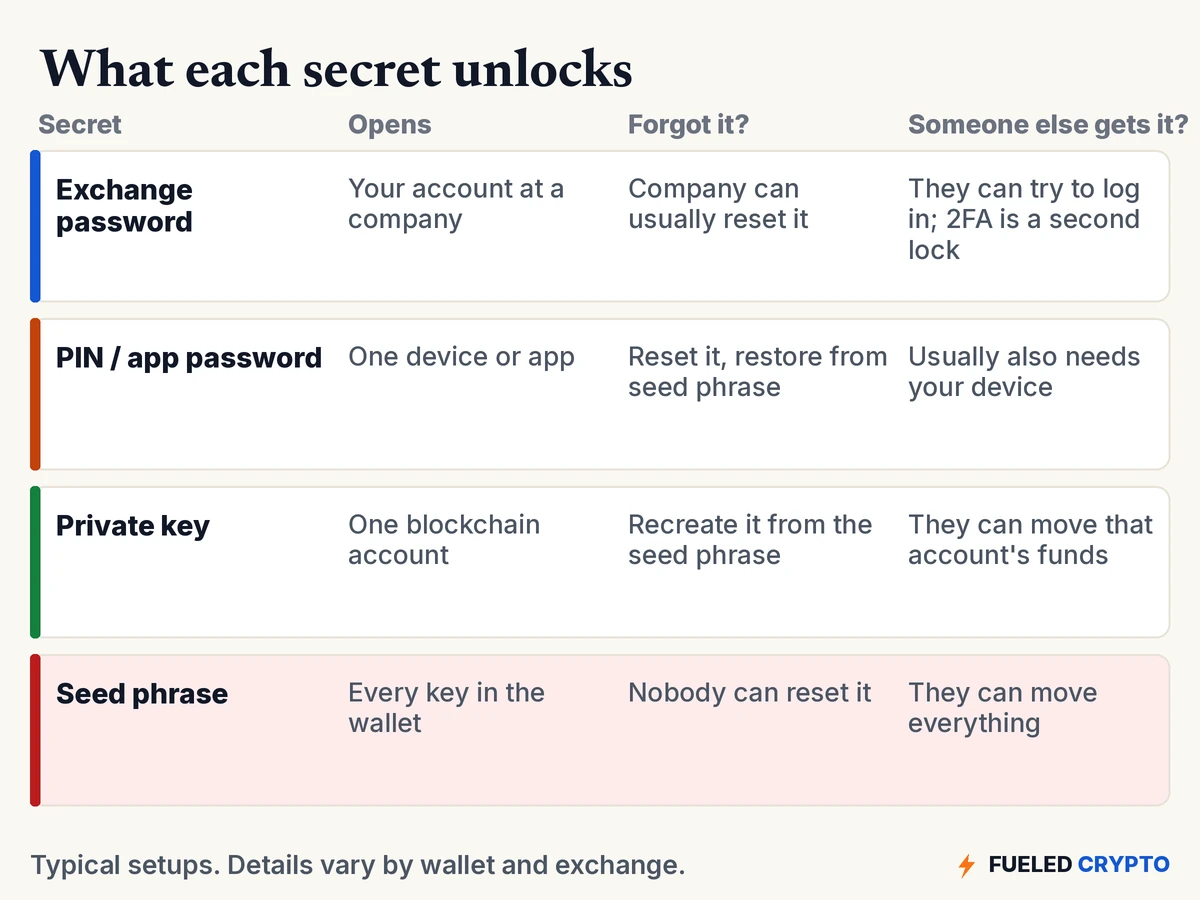
Notice the "forgot it?" column. The further down the list you go, the fewer people can help you. A company can reset a password. You can reset a device yourself, if you have the seed phrase. But nobody can reset a seed phrase. Hardware makers say plainly that they can't retrieve it for you; one says it is "unable to retrieve your Secret Recovery Phrase or PIN."
One seed phrase, many keys
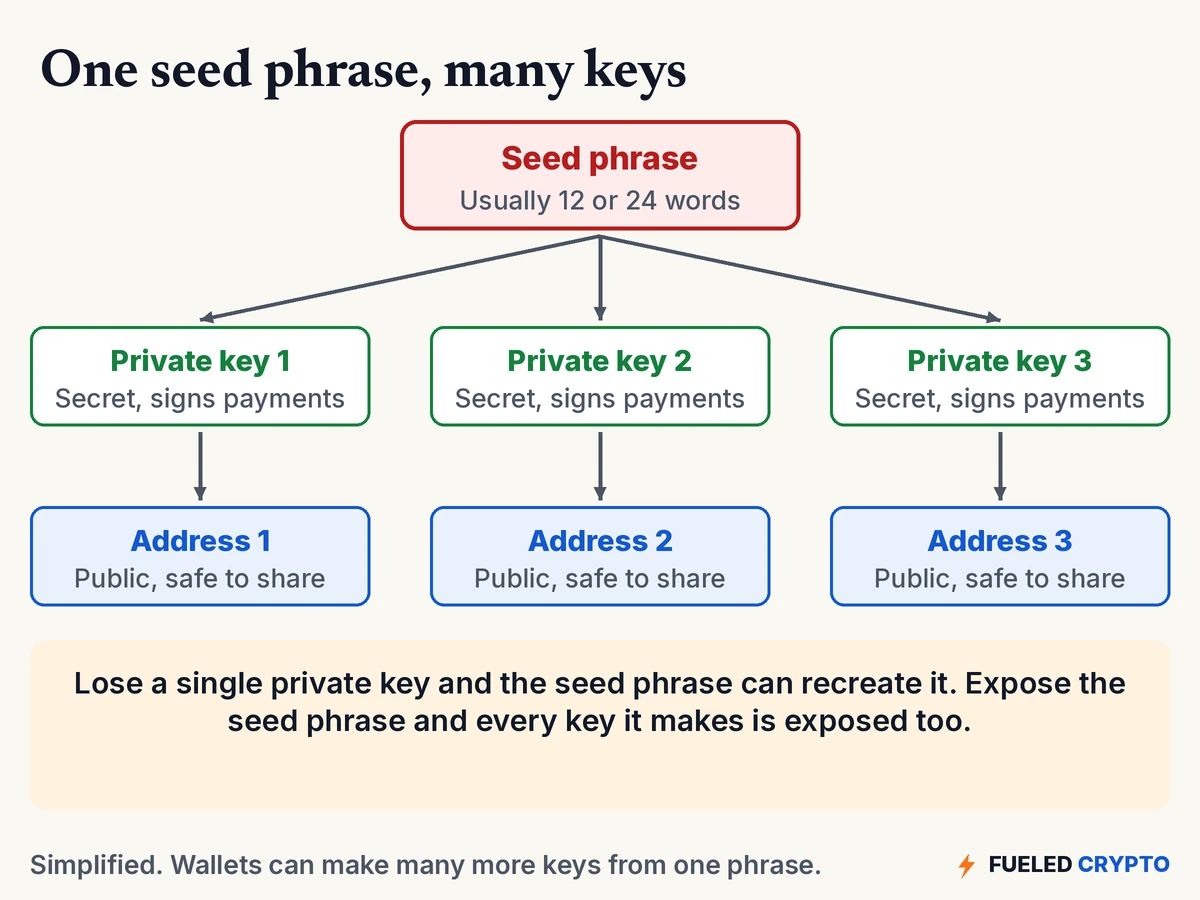
A wallet can make many private keys, each with its own address, all from one seed phrase. That's why a single sheet of words can restore a whole wallet with many accounts. It's also why exposing it exposes every account at once.
Addresses are different. An address is public, like an account number. Sharing it lets people send you crypto, but it can't be used to take any.
Where each one belongs
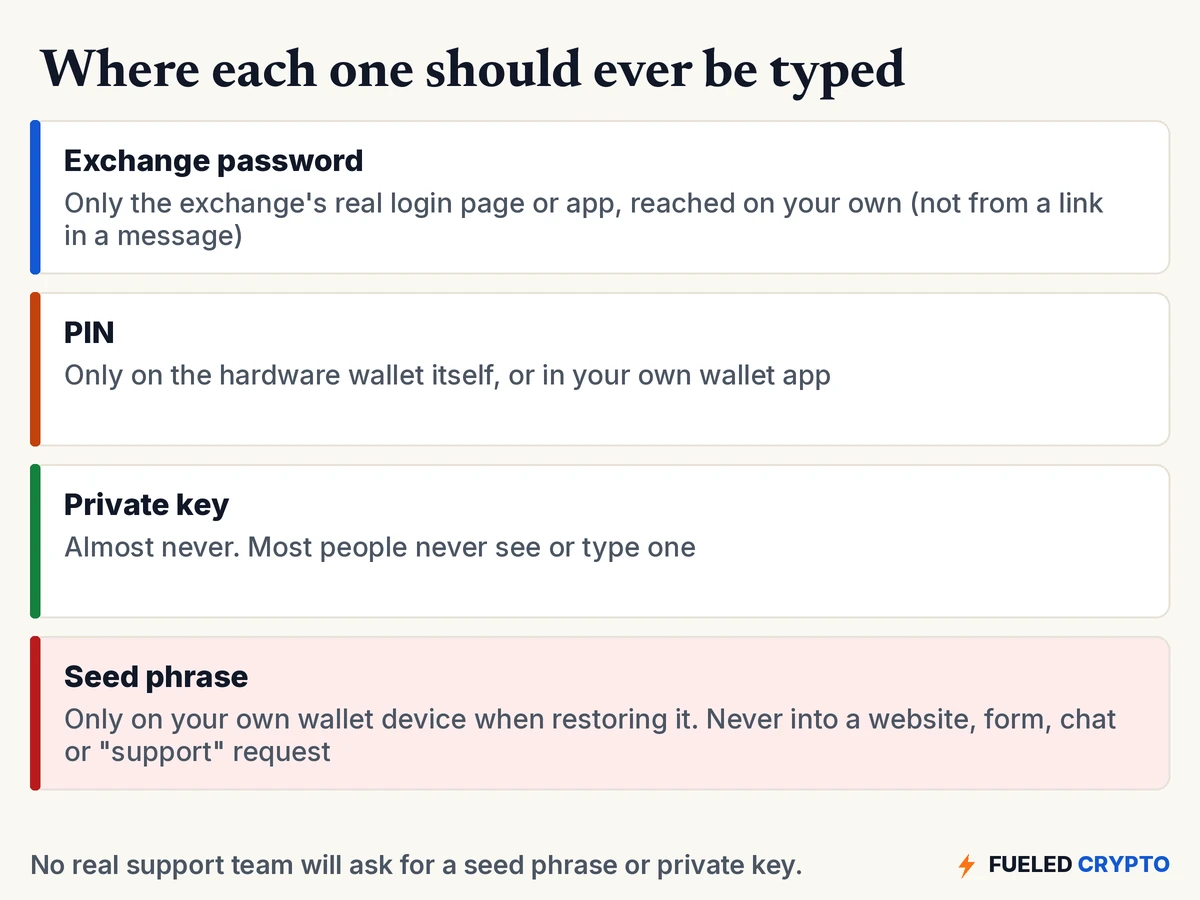
Ethereum.org's security page is blunt: "Never, for any reason, share your recovery phrase or private keys," and "No legitimate service, support agent, or website will ever ask you for these."
Scammers know most people don't know the difference between these secrets. A message saying "verify your wallet" or "sync your account" that asks for your recovery phrase is a scam, every time. Our scam guide walks through the common versions. If you think a seed phrase has been seen by someone else, our guide on what to do if your crypto is stolen covers the next steps.
For how to store a seed phrase safely, including extra protection like a passphrase, see our seed phrase best practices guide.
Common mix-ups
- "My wallet app password is my backup." Usually not. In most recovery-phrase wallets it only unlocks the app on that device.
- "If I forget my hardware wallet PIN, my coins are gone." Not if you have your seed phrase. The coins are on the blockchain, and the phrase restores access.
- "The company can reset my seed phrase." Nobody can. Wallet makers generally don't keep a copy. (Some offer optional backup services, which are a separate choice with their own trade-offs.)
- "A passphrase is the same as my password." In crypto, a "passphrase" often means an optional extra word added to a seed phrase, which creates a different wallet. It's covered in our seed phrase guide.
- "My address is secret." It's public and safe to share. The keys behind it are the secret.
- "Typing my seed phrase into a website to check it is fine." It isn't. Only type it into your own wallet device when restoring.
Words you'll keep hearing
- Seed phrase / recovery phrase / secret recovery phrase / mnemonic: the word list that backs up a wallet's keys.
- Private key: the secret that signs payments from one account.
- Public key / address: the shareable side, used to receive.
- PIN: the code that unlocks a hardware wallet.
- 2FA / multifactor authentication: a second check, like a code or security key, on top of a password.
- Passphrase: in crypto, an optional extra word added to a seed phrase.
- Self-custody: holding your own keys instead of leaving them with a company.
Frequently asked questions
Is a seed phrase the same as a password? No. A password unlocks an account or app, and it can often be reset. A seed phrase is a backup that can recreate every private key in a wallet on any compatible device. Nobody can reset it, and anyone who sees it can take the funds.
Is a seed phrase the same as a private key? Not quite. A private key controls one account. A seed phrase can recreate many private keys. Either one gives control of funds, so neither should ever be shared.
What happens if I forget my hardware wallet PIN? Many hardware wallets reset themselves after a set number of wrong attempts. If you have your seed phrase, you can restore the wallet on the device and set a new PIN. Without the seed phrase, access may be lost.
Can I recover my wallet with just my wallet app password? Usually not. In most wallets set up with a recovery phrase, the app password only unlocks the app on that device. To restore the wallet elsewhere, you need the recovery phrase. Check your own wallet's help pages, since some newer wallets work differently.
Can an exchange reset my password? Usually yes, after identity checks, because the exchange runs the account and holds the keys. That's different from a self-custody wallet, where no company can restore access for you.
Will a support team ever ask for my seed phrase? No. Ethereum.org says no legitimate service, support agent or website will ever ask for your recovery phrase or private keys. Anyone who asks is attempting a scam.
Do I ever need to see my private key? Most people don't. Wallets manage private keys behind the scenes and let you back them up through the seed phrase.
Where to go next
- Keys, Addresses and Wallets, for how keys and addresses work.
- Seed Phrase Best Practices, for storing the one secret nobody can reset.
- How to Secure Your Exchange Account, for passwords and 2FA on exchange logins.
- Crypto Estate Planning, for making sure family can find what they need, without exposing it.
- Crypto Glossary, for any other term.
Sources
- BIP 39: Mnemonic code for generating deterministic keys (12- to 24-word phrases, optional passphrase, binary seed).
- Ethereum.org: Security and scam prevention ("Never, for any reason, share your recovery phrase or private keys"), Glossary (digital signature, seed phrase).
- Bitcoin developer documentation: Glossary.
- CISA: Use strong passwords.
- Hardware wallet help pages: Ledger, "Forgot your PIN?" (resets after three incorrect PIN entries) and "I lost my 24-word Secret Recovery Phrase" ("unable to retrieve your Secret Recovery Phrase or PIN"), Trezor, "PIN protection on Trezor devices" (resets after 10 or 16 incorrect attempts, depending on model; "Your PIN is independent of your wallet backup").
- MetaMask Help Center: How to secure your Secret Recovery Phrase and password (app password "does not recover your wallet").
Makers and apps are cited only as sources for how PINs and passwords work, not as recommendations. All diagrams and animations are original Fueled Crypto graphics. Names in the animation are made up.
Fueled Crypto publishes news and education, not investment, tax, or legal advice. Crypto assets are volatile and can lose value. Do your own research and consider a licensed professional before making financial decisions. See our full disclaimer.
Want plain-English crypto news once a week? Subscribe to Fueled Crypto.